Containerization to become the RockStar on the stage

CNFC (Cloud Native Computing Foundation) can´t be more clear on their 2020 survey report:

The use of containers in production has increased to 92%, up from 84% last year, and up 300% from our first survey in 2016. Moreover, Kubernetes use in production has increased to 83%, up from 78% last year.

Related to the usage of cloud native tools there are also some clear tendences:
• 82% of respondents use CI/CD pipelines in production.
• 30% of respondents use serverless technologies in production.
• 27% of respondents use a service mesh in production, a 50% increase over last year.
• 55% of respondents use stateful applications in containers in production
.

What happens when someone adopts containers just for testing in their company?…in less than 2 years the containers are adopted in pre-production and production as well.
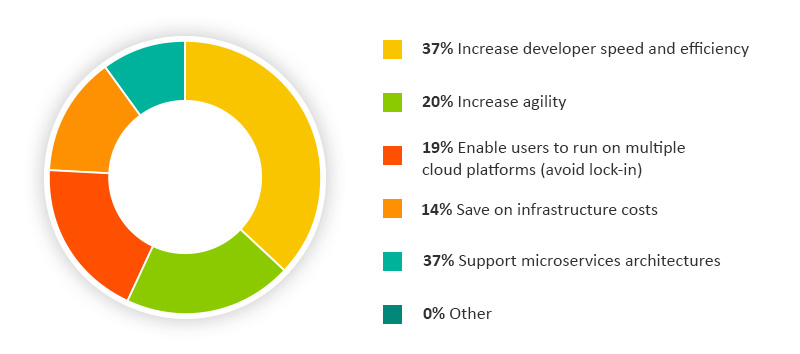
Why containerization is so extended?

Here are some facts i figure out.

Devops friendly – Well, there are some reasons, clear as water .. Almost all the big companies within the enterprise segment have a devops CI/CD strategy already deployed..so they´ve realised that integrating the builds and delivery versions with containers it´s quite agile and effective to compare those software last versions with several libraries as the runtime can be isolated easily and doesn´t depend on a operating system. So to summarize you can have quite quick several pods with containers ready to test two or three versions of your products with their libraries and plugins, packet managers or several artifacts depending on the version and test features, UX, bugs or just performance.. All aligned with your preferred repository solution: Bitbucket, Git, Github, etc.

Multicloud – Another fact and quite solid, it´s Kubernetes run on any cloud, private or public and you can orchestrate clusters with nodes wherever you want, without limitations on storage, compute or locations. Even you have at your disposal a great number of tools to orchestrate containers, not just Kubernetes but also Docker Swarm. To conclude, you can see bellow Docker as simple container runtime which was a tendency in RightScale 2019 survey. Now ,and that´s how technology change from one day to the next, Docker as an underlying runtime is being deprecated in favor of runtimes that use the Container Runtime Interface (CRI) created for Kubernetes. … Anyway, Docker is still a useful tool for building containers.

Cost Savings -You can roll out Microservices on demand and without investing a euro on hardware if you want a pure cloud solution. Just create your pads or simple containers and kill them when you want. Pay as you go, pure OPEX. That means reduce CAPEX on hardware and licenses and forget amortization.

Remove your Legacy applications on your on pace – Also, on one hand, big companies want to reduce legacy applications as they need to eliminate monolithic applications, which use to be very critical, with old versions software and dependences on hardware and licences and poor performance and scalability. On the other hand, they are compromise more than ever with the “Cloud first” principle for new IT services because they need to be global, reduce cost and improve resiliency and many CIOs know that public cloud bring those advantages from scratch.

Security – Least but not less. Containerization reduce the expose surface of your applications, eliminate any operating system bug, and allow to take control on known library vulnerabilities with your Software Quality team and your CISO. Networking is also an area where you can watch out the bad guys as traffic is flowing in and out of the containers and you can configure with granularity what is allowed and what not. Finally, you can monitorice the whole microservices solution with open source tools, cloud providers integrated tools or more veteran thirty party solutions.

In the next post we will see differences and similarities between AKS and EKS.

Enjoy the journey to the cloud with me…see you then in the next post.

Testing Azure File sync: A Headquarter file server and a Branch file server working together

Microsoft Hybrid scenario with Azure File Sync

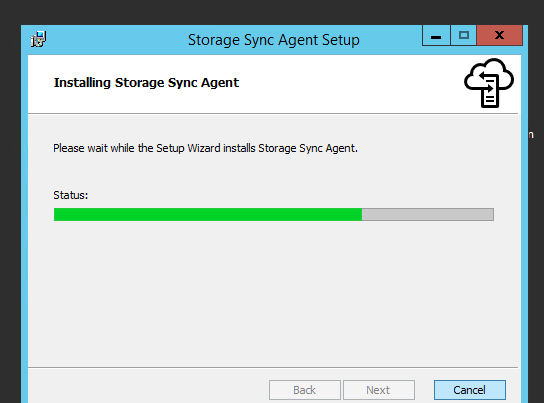
As I showed in the previous post Azure file sync needs an agent to be installed in your Windows File Servers thought Windows Admin Center or directly if you download it and install it in your file server. Once it´s done you can proceed to leverage the power of this feature in your global environment, but please take into account the agent is right now only available with the following operating system for your file servers.


Remember to create an Azure file sync, you need an storage account as we did in the previous post, (better general purpose v2), a file share and install the agent on those file server where you want to share data. Then as we did, you can proceed to configure the cloud endpoint and servers endpoint within your sync group on the Azure Portal.

Add the servers from several braches and obviously your head quarter file server..

Verify your servers are synchronized..

Proceed to create a file in your local head quarter file server..

It is automatically replicated on our example to the branch file server..

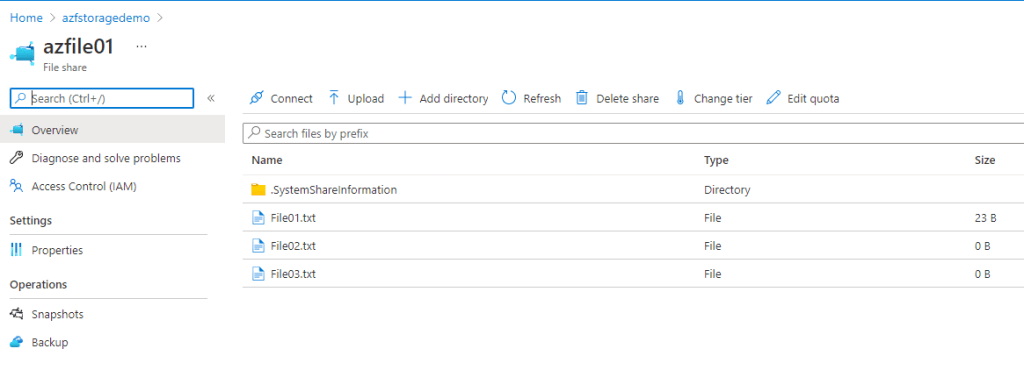
Even if you pay attention to the File share in the Azure Portal you can see all the files from both servers (one in the Head quarter and the other one your branch file server) replicating their data on the File Share in Azure..

Now imagine, you have users all over the world, you need your employees are working on the same page with flexibility and on demand, even you need a backup of that day from time to time and a disaster recovery strategy. Even more, you need to empower your users to be more productive remotely, with their MacOS or Windows Laptops from anywhere.

You can have users working with the same files all around the world and several operating systems (MacOS, Windows 7 , 8.1 or 10 and Linux Ubuntu, Red hat or CentOS) leveraging any protocol that’s available on Windows Server to access your data locally, including SMB, Network File System (NFS), and File Transfer Protocol Service (FTPS). For them it´s transparent where the files are.

But what about performance and scalability?…Well, You can create as much sync groups as your Infrastructure would demand. Just be aware you should design and plan thinking on the amount of data, resiliency and Azure regions where you are extending your business. Anyway it is important to understand the way our data it will be replicated:

  • Initial cloud change enumeration: When a new sync group is created, initial cloud change enumeration is the first step that will execute. In this process, the system will enumerate all the items in the Azure File Share. During this process, there will be no sync activity i.e. no items will be downloaded from cloud endpoint to server endpoint and no items will be uploaded from server endpoint to cloud endpoint. Sync activity will resume once initial cloud change enumeration completes. The rate of performance is 20 objects per second
  • Initial sync of data from Windows Server to Azure File share: Many Azure File Sync deployments start with an empty Azure file share because all the data is on the Windows Server. In these cases, the initial cloud change enumeration is fast and the majority of time will be spent syncing changes from the Windows Server into the Azure file share(s).
  • Set up network limits: While sync uploads data to the Azure file share, there is no downtime on the local file server, and administrators can setup network limits to restrict the amount of bandwidth used for background data upload. Initial sync is typically limited by the initial upload rate of 20 files per second per sync group.
  • Namespace download throughput When a new server endpoint is added to an existing sync group, the Azure File Sync agent does not download any of the file content from the cloud endpoint. It first syncs the full namespace and then triggers background recall to download the files, either in their entirety or, if cloud tiering is enabled, to the cloud tiering policy set on the server endpoint.
  • Cloud Tiering enabled. If cloud tiering is enabled, you are likely to observe better performance as only some of the file data is downloaded. Azure File Sync only downloads the data of cached files when they are changed on any of the endpoints. For any tiered or newly created files, the agent does not download the file data, and instead only syncs the namespace to all the server endpoints. The agent also supports partial downloads of tiered files as they are accessed by the user.

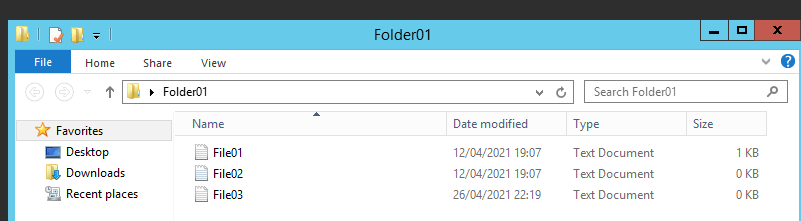
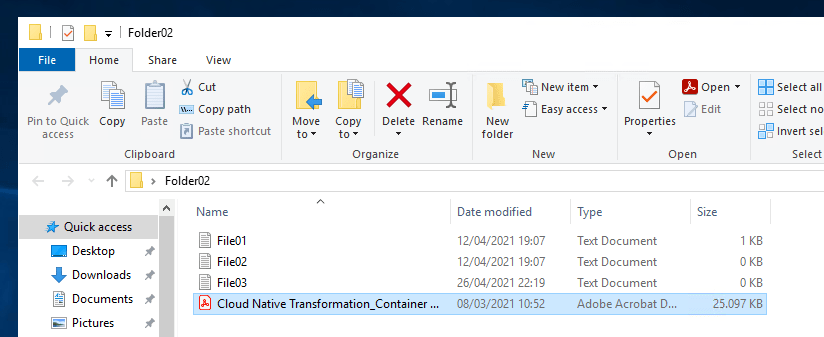
Here I show an example with a 25 MB file. Synchronization was almost immediate as the Sync Groups was already set up. If we upload a file to Folder 02 in our head quarter file server you can see it on the branch in the Folder 01 as well in a matter of second or even less depending on the configuration as we said..


Azure Files supports locally redundant storage (LRS), zone redundant storage (ZRS), geo-redundant storage (GRS), and geo-zone-redundant storage (GZRS). Azure Files premium tier currently only supports LRS and ZRS. That means an incredible potential to replicate data depending on resilience and with solid granularity to several regions in the world.


In the next post we´ll see how to integrate Azure File with AAD or enhance your Windows VDI strategy with FSLogic app containers. See you them..

How to consolidate data for Headquarter and Branches in a smart way: Windows Admin Center and Azure File Sync

Windows Admin Center on Microsoft docs

As i mentioned in a previous post, explaining different alternatives to work in a colaborative way when your company has employees all over the globe https://cloudvisioneers.com/2020/06/06/how-to-consolidate-data-for-small-branches-globally-and-work-together-with-few-investment-i/ , one of the best options in terms of simplicity to share data would be Azure File Sync as you can consolidate data for several file servers. But now as preview you can set up a whole sync folders strategy from Windows Admin Center to consolidate data from branches and head quarters on a file share with all the changes done during the working day.


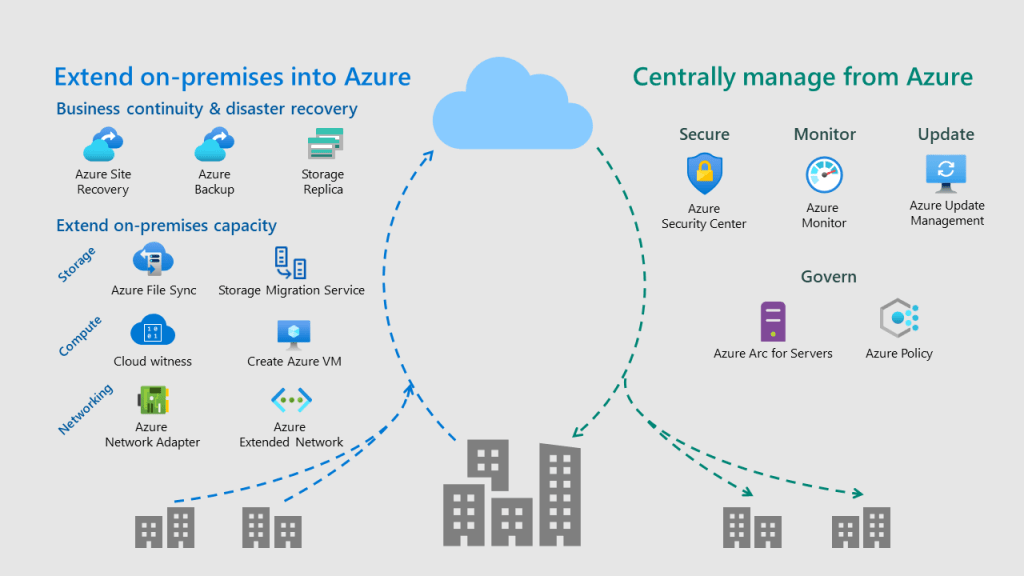
The Azure hybrid services can be manage from Windows Admin Center where you have all your integrated Azure services into a centralized hub.


But what can kind of tasks can we do?

  1. Set up a backup an disaster recovery strategy. – Yes, you can define which data to backup from your file servers on premise to the cloud, retentions as well as determine an strategy to replicate your VMs in Hyper-V using Windows Admin Center.
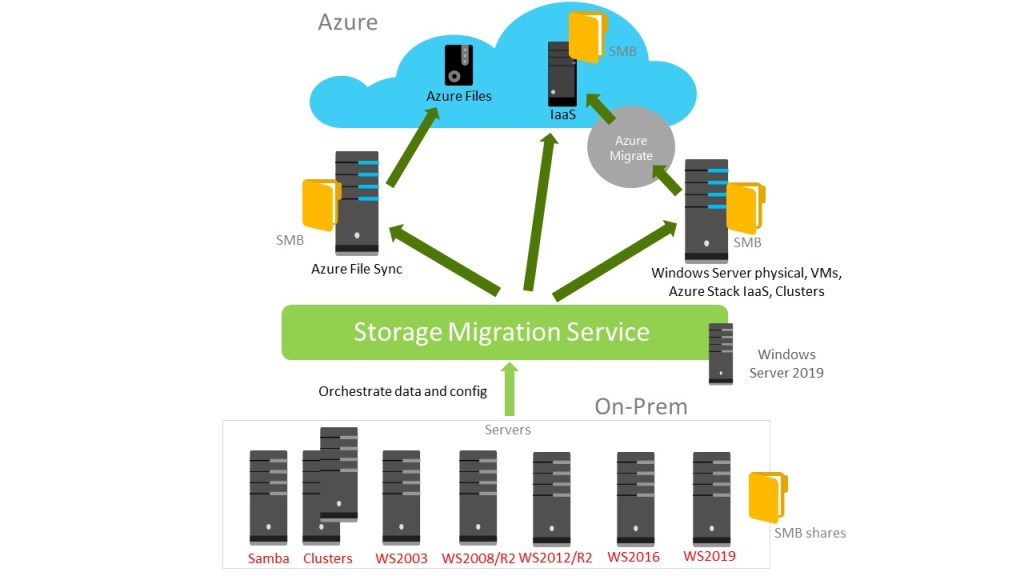
  2. Planning an storage migration.– Identify and migrate storage from on premise to the cloud based on your previous assessment. Even more not just data from Windows file servers or windows shares but also Linux SMB shares with Samba.
  3. Monitoring events and track logs from on premise servers. – It quite interesting to collect data from on premise in a Log Analytics workspace in Azure Monitor.  Then it is very flexible to customize queries to figure out what is happening and when is happening on those servers.
  4. Update and patch your local servers. – With Azure Update Management you have the right solution using Automation that allows you to manage updates and patches for multiple virtual machines on premise or even baremetal.
  5. Consolidate daily work from a distributed data enviroment without limitations on storage or locations. – You can use Windows Admin center to set up as we told before a centralized point for your organization’s file shares in Azure, while keeping the flexibility, performance, and compatibility of an on-premises file servers. In this post, we are going to explain this feature more in depth.
  6. Other features:
    1. Extent your control of your infrastructure with Azure Arc and configure it with Windows Admin Center so, for example, you can run azure policies and configure regulations for your virtual machines a baremetal on prem.
    2. Create VMs on Azure directly from the console.
    3. Manage VMs on Azure from the console.
    4. Even deploy Windows Admin Center in a VM on Azure and work with the console on the cloud.

Now we know some of the important features that you can use with Windows Admin Center, let´s focus on Azure file sync configuration and see how it works.


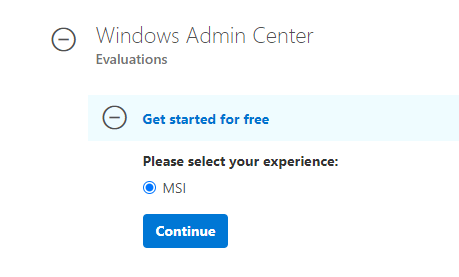
Let´s start downloading Windows Admin Center from here

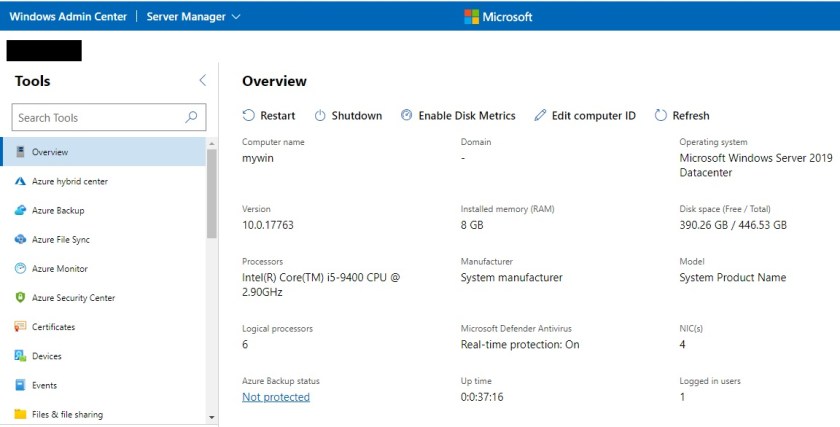
Now after installing you will see the console using the url from local called: https://machinename/servermanager where you can browse information and details of your local or virtual machine and leverage lot of features to manage it.

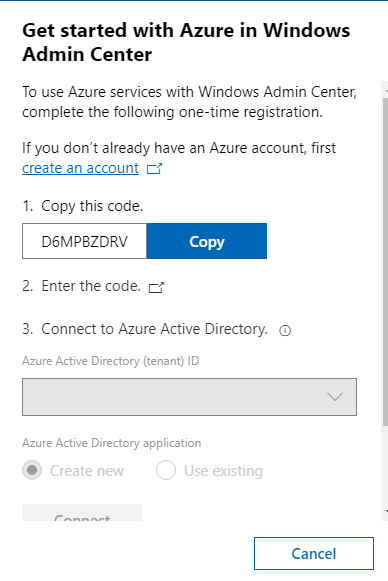
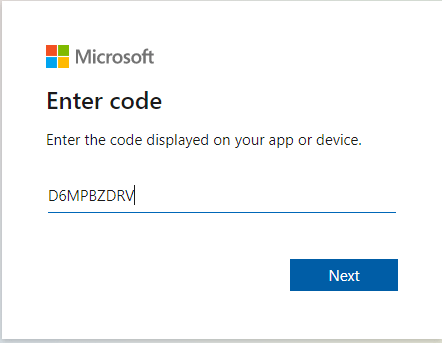
If you click on hybrid center you can configure an account on your azure portal to connect to your azure suscriptions. It will create an Azure AD application from which you can manage gateway user and gateway administrator access if you want in the future. Therefore you will need to first register your Windows Admin Center gateway with Azure. Remember, you only need to do this once for your Windows Admin Center gateway.

You have two options,create a new Azure Active Directory application or use and existing one, on the AAD your choose.

To pointed out here, you can configure MFA for your user later, or create several groups with users for RBAC to work with your Windows Admin Console. Now you will have available several wizards to deploy the strategy it suits better to your business case.

Let´s start configuring all the parameters. Maybe it takes some time to respond, it is on Preview right now (april 2021).

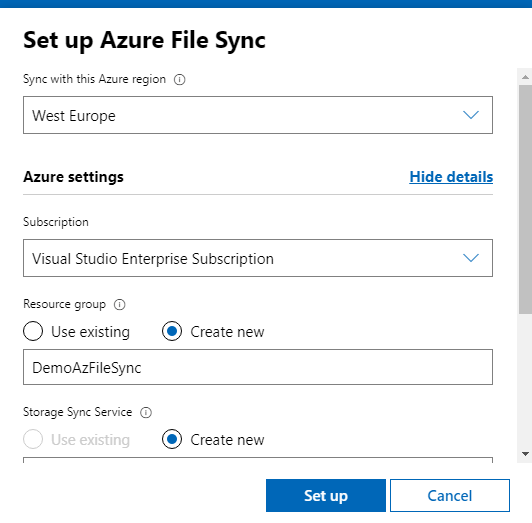
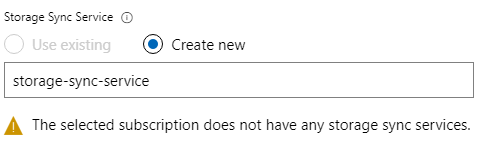
Choose an existing Storage Sync Service or create a new one..

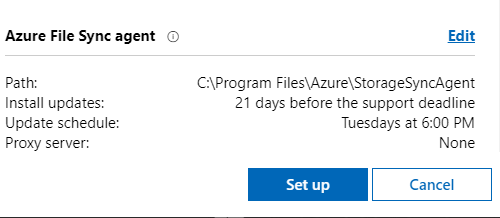
Prepare the Azure File sync agent as needed to be installed on your Windows Admin Center host machine..and hit on “Set up” button.

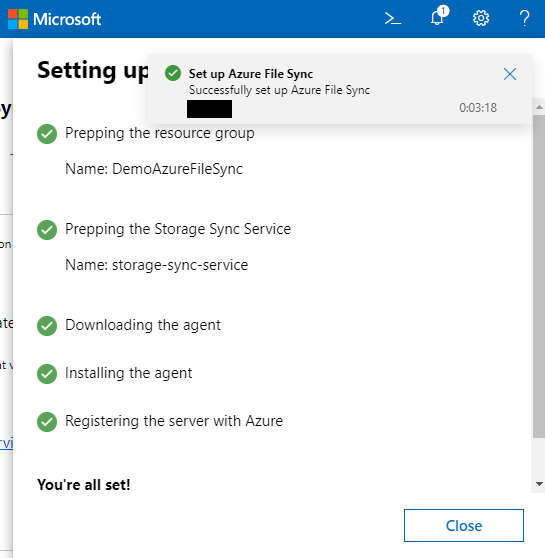
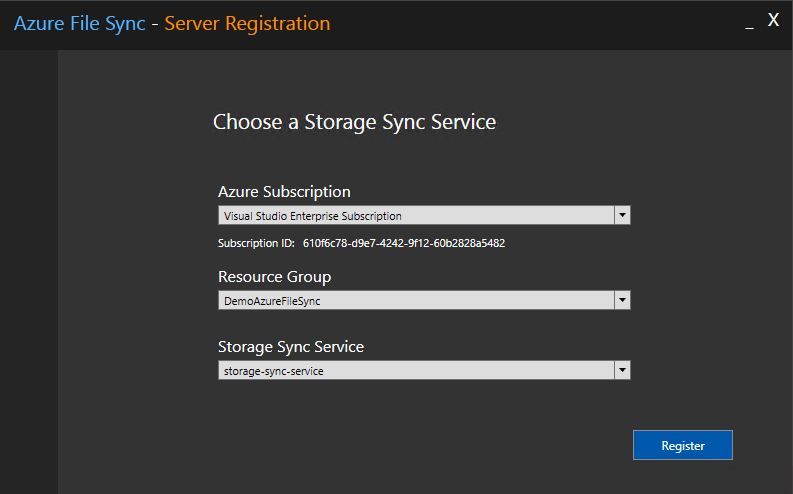
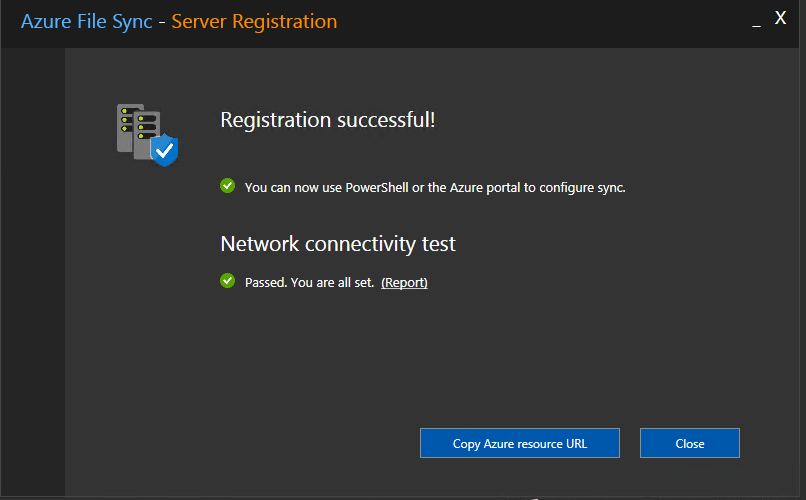
And now register your server on the “Storage sync service”..

We got to register our new server on Azure File Sync service on Azure to syncronize data on a file share with other File Servers localted all over the world.

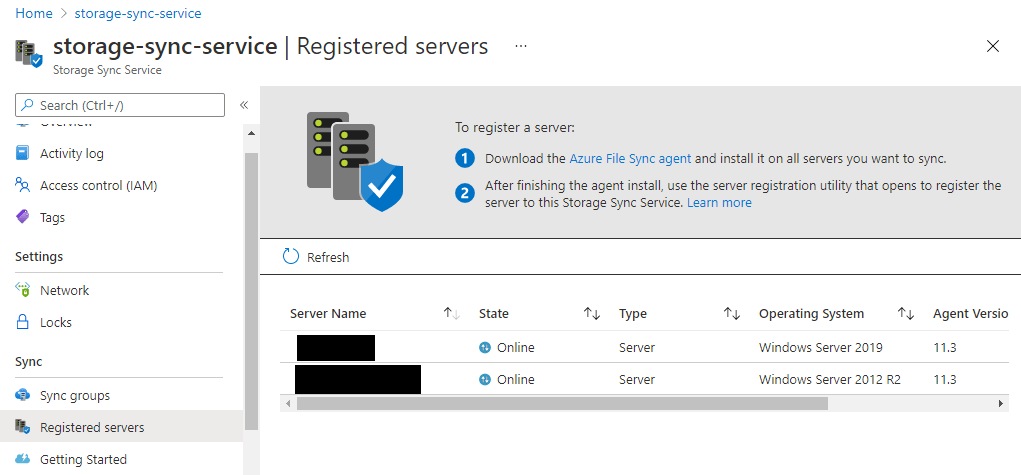
Register servers on my Azure suscription

In the next post we´ll configure the following steps to consolidate a global repository using this file share on Azure so all the employees, no matter where they work can be on the same page with the rest of braches and head quarter.

See you them..

Windows Admin Center to rule hybrid cloud solutions on Azure and on prem

Windows admin center is a free tool to configure and manage your windows servers and linux servers on premise as well as on the cloud. No matter if you want to monitor performance on lots of servers, maintain TCP Services for your network or active directory validations, check security updates history on several servers, manage storage massively even for several partner providers such as HPE, DELL-EMC, etc or last but not least you want to migrate VMs to the cloud.


A simple pane of glass to work with your infrastructure on a hybrid model increase efficiency, reduce human errors and improve rapid response when needed.


Previously there were lots of “mmc consoles” to manage several aspect of daily sysops tasks. With Windows admin center, you solve this problem and also provide a unique approach to manage a hybrid cloud. Something that not all the cloud providers are facing right now. And believe me, it’s pretty useful.

What are the most important features that brings this tool?

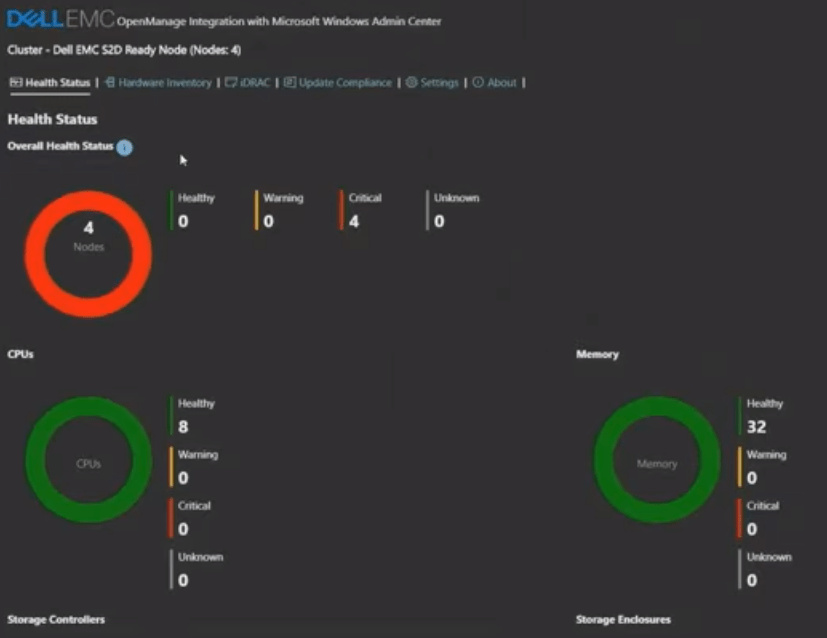
  • Extension to integrate Servers hardware details– Let’s say you need to know the health of several components on your on prem HPE Servers, Fujitsu, Lenovo, Dell-EMC,etc. Now you have extensions to manage all this information and check the power supply status, the memory usage, CPU,storage capacity and other details. Even if you want an integration with ILO or IDrac, for example, well, through the Window Admin Center it’s possible.
  • Active Directory extension- It is crucial for a sysop to maintain the Active Directory and to work with quite usual tasks such as:
    • Create a user
    • Create a group
    • Search for users, computers, and groups
    • Details pane for users, computers, and groups when selected in grid
    • Global Grid actions users, computers, and groups (disable/enable, remove)
    • Reset user password
    • User objects: configure basic properties & group memberships
    • Computer objects: configure delegation to a single machine
  • Manage a DHCP Scope- Another cool option, DHCP extension allows you to manage connected devices on a computer or server.
    • Create/configure/view IPV4 and IPV6 scopes
    • Create address exclusions and configure start and end IP address
    • Create address reservations and configure client MAC address (IPV4), DUID and IAID (IPV6)
  • DNS extension –  allows you to manage connected devices on a computer or server.
    • View details of DNS Forward Lookup zones, Reverse Lookup zones and DNS records
    • Create forward Lookup zones (primary, secondary, or stub), and configure forward lookup zone properties
    • Create Host (A or AAAA), CNAME or MX type of DNS records
    • Configure DNS records properties
    • Create IPV4 and IPV6 Reverse Lookup zones (primary, secondary and stub), configure reverse lookup zone properties
    • Create PTR, CNAME type of DNS records under reverse lookup zone.
  • Updates– allows you to manage Microsoft and/or Windows Updates on a computer or server.
    • View available Windows or Microsoft Updates
    • View a list of update history
    • Install Updates
    • Check online for updates from Microsoft Update
    • Manage Azure Update Management integration

To summarize Microsoft is supporting now daily sysops duties through Windows Admin Center.

  • Storage extensions– allows you to manage storage devices on a computer or server. For example, let’s say you want to use the Storage Migration Service because you’ve got a server (or a lot of servers) that you want to migrate to newer hardware or virtual machines on Azure. You can install the Storage Migration Service extension on your Windows 2019 version 1809 or on a later operating system to work. Previous OS versions don´t have this extension available. With this extension you can do cool staff as follows:
    • Inventory multiple servers and their data
    • Transfer files, file shares, and security configuration from the source servers to destination. Even some Linux Samba repositories if needed.
    • Optionally “Copy&Paste” the identity of the source servers (also known as cutting over) so that users and apps don’t have to change anything to access existing data
    • Manage one or multiple migrations from the Windows Admin Center user interface in parallel
  • Create Virtual Machines on Azure- Windows Admin Center can deploy the Azure VMs, configure its storage, join it to your domain, install roles, and then set up your distributed system. This integrates VM deployment into the Storage Migration Service that i was explaining above. So you don’t need to connect to the Azure Portal or run a powershell script for example. But create and configure directly the VMs you need on the Windows Admin Center Portal.
  • Integration with Azure File Sync- Consolidate shared files using Azure File Sync. This is pretty useful if you have lots of small branches and want to centralize all the daily documents on a cloud repository with backup included. We will explain how it works in the next post.

As you can see , Microsoft has done a big effort providing a tool to work daily tasks as maintain TCP Services or manage your data, no matter if it is on premise on a Fujitsu Server with local disks, a SAN or on the cloud. Even helps you to leverage the cloud functionalities to remove old servers and hardware.


See you them in the next post. I hope you enjoy the journey to the cloud…

Be hybrid my friend: Global AWS Vision

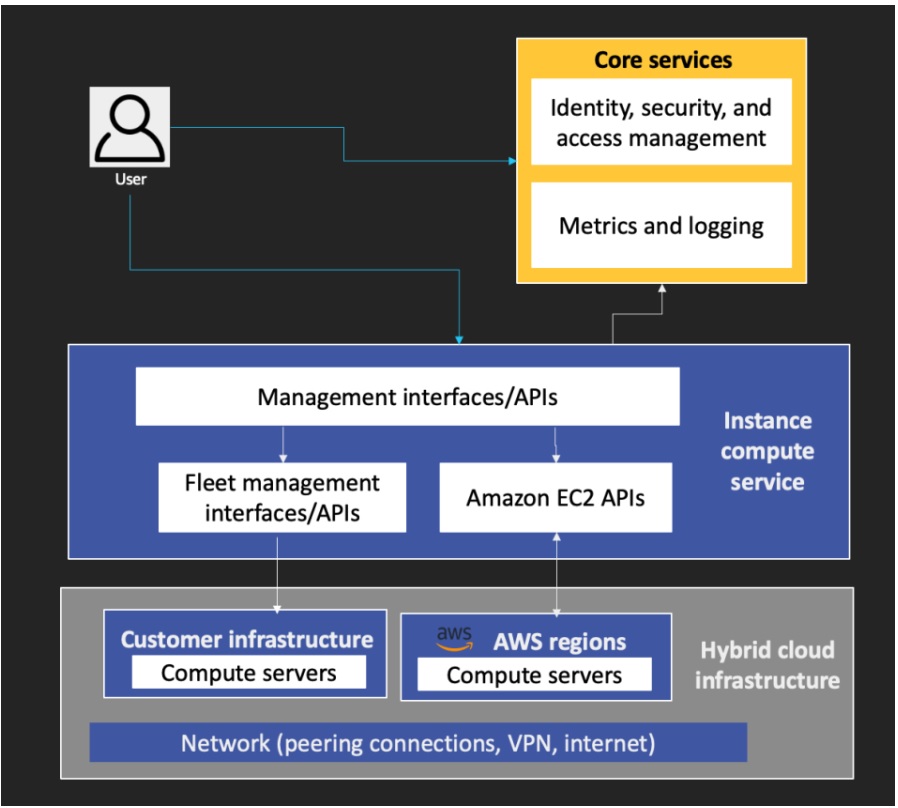
AWS reacted with a powerful solution to Google Anthos and to the Azure Stack “Fiji” project which launched as i´ve explained in the previous post Azure Stack hub, Edge and Azure Stack HCI actors to the Microsoft scene. AWS Outposts is a compendium of technical solutions together with best in class AWS management support. Outposts, provides the same experience for the applications as being in the cloud and unified hybrid cloud management through the use of the same APIs and management tools across on-premises and AWS infrastructure.

How is the AWS hybrid strategy?

On one hand, AWS knows that the battle with those legacy applications and monolithic workloads that will remain during some years more in the backbone of business logic is a key factor. But moreover they focus on four scenarios: Cloud Bursting, Backup and Disaster Recovery, Distributed data processing, Geographic expansion.


Scenarios to leverage the AWS cloud

Cloud Bursting is an application deployment model in which the application primarily runs in an on-premises infrastructure, but when the application requires to increase performance or need more storage, AWS resources are utilized. Let´s say a HPC scenario using Fargate or maybe a migration from legacy applications to containers on ECS or EKS.

Backup and Disaster Recovery where the customer can set up business continuity strategies improving resilience, data durability and high availability even. For example, archiving and data tiering with S3.

Distributed data processing to integrate your origin data from near -real time processes or batch processes on your company and being transform quickly with a cost-effective approach on AWS using for example Firehose together with data lake or data warehouse strategist using Redshift.

Finally, Geographic expansion which drives a tremendous potential when you use global data base approaches (SQL or not SQL) supporting your data on DynamoDB or Aurora Database.

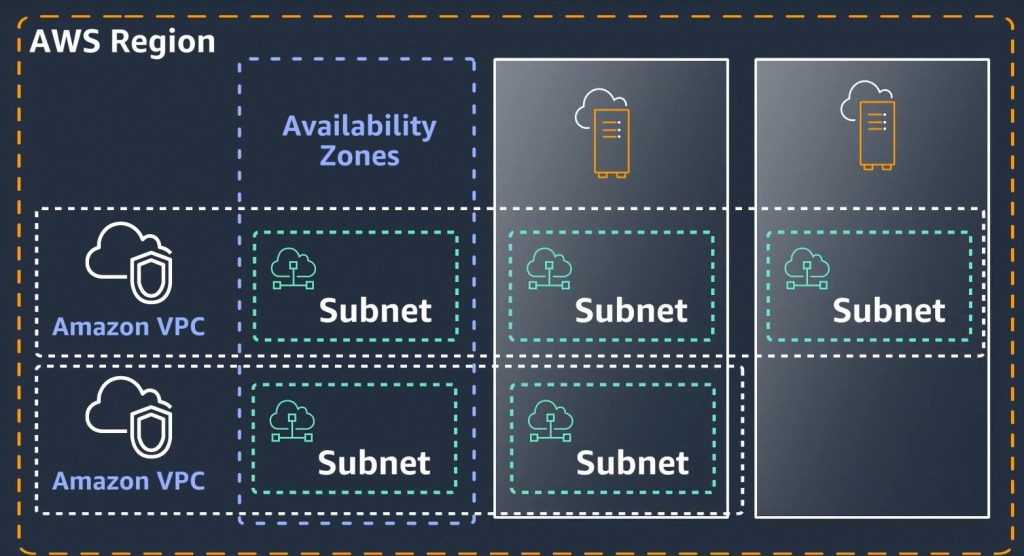
On the other hand, related to networking you can extend your existing Amazon VPC to your Outpost in your on premises location. After installation, you can create a subnet in your regional VPC and associate it with an Outpost just as you associate subnets with an Availability Zone in an AWS Region. Instances in Outpost subnets communicate with other instances in the AWS Region using private IP addresses, all within the same VPC.

For example, let’s say you need to maintain on premise a data warehouse due to regulations but you need a HPC (high performance computing) or even MPP (massive parallel processing ) from time to time to perform some calculations with some dataset and you don’t want to invest a lot of money for this stationary estimations. All the outcomes will be store locally once they are prepared and transformed in more accurate data in the cloud. Obviously, the cluster and the slaves nodes will be shut down afterwards.

AWS helps you to identify the right VMs profiles for the right hybrid workload you want to run.

Edge Computing

With Snowball Edge you can collect data in remote locations, use machine learning and processing, and storage a first define datasets in environments with intermittent connectivity. There are three different flavors: Snowball Edge computing perfect as i said for IoT solutions, Snowball data transfer to migrate massive information to the cloud or Snowball edge storage as a first layer to your data on prem before being process move to S3 for example.

AWS Outposts is fully managed and supported by AWS. Your Outpost is delivered, installed, monitored, patched, and updated by AWS. With Outposts you can reduce the time, resources, operational risk, and maintenance downtime required for managing IT infrastructure.

As we mentioned with the Microsoft Hybrid solution, AWS can also manage in a single pane of glass the whole infrastructure . Can you figure out the tremendous benefits to your customers, users and partners to be there when it’s needed reducing risks as eliminate single point of failure, reduce latency and improve business continuity, better security and governance or increase in an exponential manner your Go-To-Market strategies?.

See you then in the next post, take care and stay safe…

Be hybrid my friend: Global Azure Vision

After one year of pandemic there is a very clear fact, a majority of enterprises expect to increase cloud usage. On this scenario, there are traditional lift & shift migrations but also many companies choose to paassify applications (strategy to move applications on VMs to cloud multi tenancy managed platforms like Azure AppServices or AWS  Elastic Beanstalk) or even more transform their applications to a containerization (the process of packaging an application along with its required libraries, frameworks, and configuration files together over a containerization engine as Docker )

In this context there are still lots of legacy applications and monolithic workloads that will remain during some years more in the backbone of business logic for a huge number of industries. Not to mention, some compliance or sovereignty policies to retain specific information in local data centers for the company or the country. So the battle in coming years for the cloud providers is go hybrid enough to leverage the cloud for new innovative solutions, for those areas where the competitors can win opportunities in our market, or where we can see the benefits to transform applications to the cloud, such as increase Got-To-market in other regions, improve efficiency, reduce risk, save money and eliminate points of failure.

How is the Microsoft hybrid strategy?

There are several technologies that bring a lot of value to the Azure hybrid scenario. The Mantra here is run what you want where you need it without losing control even if it’s on premise, a private cloud like BT or Telefonica or a different cloud provider like AWS with their compute IaaS solutions on EC2.


Azure Stack Hub

Azure Stack will be your solution if you want to leverage the potential of serverless but using your infrastructure locally as well. You can connect your local data center using Azure Stack Hub.

For example, let’s say you need to maintain on premise a data warehouse due to regulations but you need a HPC (high performance computing) or even MPP (massive parallel processing ) from time to time to perform some calculations with some dataset and you don’t want to invest a lot of money for this stationary estimations. All the outcomes will be store locally once they are prepared and transformed in more accurate data in the cloud. Obviously, the cluster and the slaves nodes will be shut down afterwards.

Azure Stack Edge

Collect data, analyse, transform and filter data at the edge, sending only the data you need to the cloud for further processing or storage. Use ML (Machine Learning) to prepare datasets that you need to upload to the cloud. Azure Stack Edge acts as a cloud storage gateway which transfers to Azure whats is needed, while retaining local access to files. It has local cache capability and bandwidth throttling to limit usage during peak business hours.

Boost your IoT, and Edge computing solutions with this technology. The opportunities to grow here is just your imagination.

There are several models that can work at your edge depending on your needs. Just need to Simply order your appliance from the Azure portal in a hardware-as-a-service model and paid monthly via an Azure subscription.

Azure Stack HCI

It is a new hyperconverged infrastructure (HCI) operating system delivered as an Azure service that provides the latest azure features as well as performance to work with the cloud. Therefore, you can roll out Windows and Linux virtual machines (VMs) in your data centre or at the edge using the previous appliances showed above.

For example, let’s say you want to set up a Disaster Recovery strategy using world-class hyper-converged infrastructure with some Linux LAMP solutions or specific applications with the backend tier running on Azure Stack HCI and the frontend with some Web Services running on Azure. But the data remains on your data center once again if your country or company regulations don´t allow to store it on the cloud.

But the strongest point in this Microsoft Hybrid solution will be to provide an integration with AKS so your applications will be running anywhere from on premise to any azure region. You will be able to deploy containers on the same network, your VNET on Azure together with your VLAN on premise and move, create or kill containers of thousand on applications with their own libraries, run time and piece of software from cluster to cluster empowered with Kubernetes. Can you believe such potential for a global enterprise company?.

Azure Arc

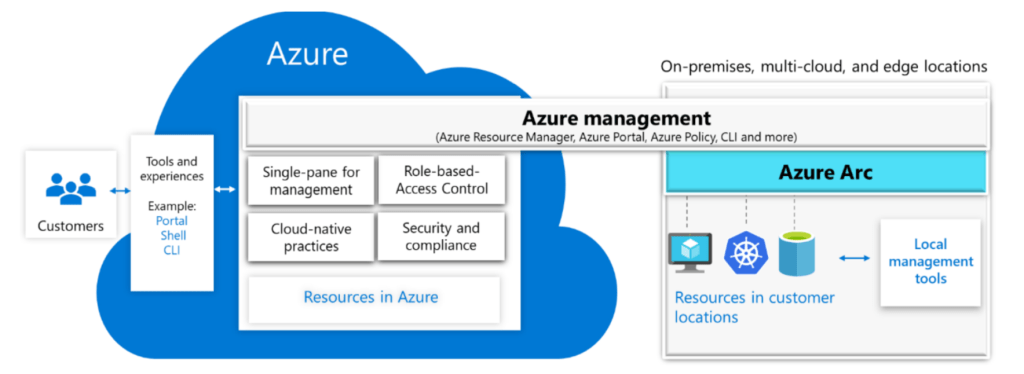
Here comes the key ingredient of the recipe. Azure Arc let users to connect Kubernetes clusters running on-premises or on any other cloud provider with Azure for a unified management experience. Arc provides a single pane of glass operating model to users for all their Kubernetes clusters deployed across multiple locations and platforms. Arc provides capabilities of Azure management to the clusters — even improving the experience with Azure features like Azure Policy, Azure Monitor, and Azure Resource Graph.

In a single pane of glass you can embrace the potential of Azure hybrid model across multiple tenants and subscriptions working together with Azure Lighthouse as well as integrating Azure Stack to roll out your application modernization strategy anywhere, anytime. Can you figure out the tremendous benefits to your customers, users and partners to be there when it’s needed reducing risks as eliminate single point of failure, reduce latency and improve business continuity, better security and governance or increase in an exponential manner your Go-To-Market strategies?.

In the next post, we will compare the hybrid potential that Microsoft offers with another big gigant, AWS.

See you them, take care and stay safe…

Azure Synapse: A new kid on the Block. Empower you company Big Data and Analytics

Some years ago, an investment to analyze data was quite expensive in terms of hardware, networking, knowledge and skills usually external to the organization and obviously data center facilities. Nowadays you can enjoy cloud native data analytics tools that can be deployed in minutes in any region of the world. This cutting edge technologies are evolving to work better together as evolves a music orchestra when musicians and the conductor know each other better. He can give then a splendid performance in the concert. So happens in the cloud, the maturity of the native tools lets you decouple components so that they run and scale independently.

But why Big Data on prem is called to extinction?. Well, it is a matter of being cost-effective in middle-terms. There are some factors that have a great impact on CIOs and CFOs to change their minds:

Big Data on premise is rigid and inelastic as the capacity planning done by the architects to build those solutions is based on picks and needs to take into account the worst cases in performance. They can not scale on demand and if you need more resources you have to wait till they are available even weeks. On the other hand, you have a technical debt if you are underutilize your Big data infrastructure.

Big Data and Data analytics platforms on premise requires a lot skills and knowledge in place from Storage, to networking, from data engineering to data science. It is complex to maintain and upgrade. What is prone to failures and low productivity.

Data and AI&ML live in separate worlds in an on premise infrastructure. Two silos that you need to interconnect. Something that doesn’t happen on the cloud.


Move to the next level. Azure Synapse

Azure Synapse is a whole orchestra prepare to give a splendid performance in the concert. It is the evolution of Azure Data Warehouse as joins enterprise data warehousing with Big Data analytics.

It unifies data ingestion, preparation & transformation of data . So companies can combine and serve enterprise data on-demand for BI and AI/ML. It supports two types of analytics runtimes – SQL and Spark based that can process data in a batch, streaming, and interactive manner. For a Data Science is great because supports a number of languages like SQL, Python, .NET, Java, Scala, and R that are typically used by analytic workloads. You don’t have to worry for escalation, you has a virtually unlimited scale to support analytics workloads.

Deploy Azure Synapse in minutes – Using Azure Quick-Start templates it is possible to deploy your data analytics platform in minutes..choose 201-sql-data-warehouse-transparent-encryption-create to do so synchronize with your Repo on Azure devops and start to configure your deployment strategy.

Ingesting and Processing Data enhacements- Data from several origins can be load to the SQL pool component on Azure Synapse. Let’s say the old data warehouse. To load that data we can use a storage account or even better a data lake storage with the help of polybase, we can use other Azure component called Azure Data factory to bring data from several origins or traditional ones like BCP for those working with SQL. After cleaning the data on staging tables you can proceed to copy to production all that make senses.

A great advantage is that you can now get rich insights on your operational data in near real-time, using Azure Synapse Link. ETL-based systems tend to have higher latency for analyzing your operational data, due to many layers needed to extract, transform and load the operational data. With native integration of Azure Cosmos DB analytical store with Azure Synapse Analytics, you can analyze operational data in near real-time enabling new business scenarios.

Querying Data – You can uses Massive Parallel Processing (MPP) to run queries across petabytes of data quickly. Data Engineers can use the familiar Transact-SQL to query the contents of a data warehouse in Azure Synapse Analytics as well as developers can use Python, Scala and R against the Spark engine. There is also support for .Net and Java.

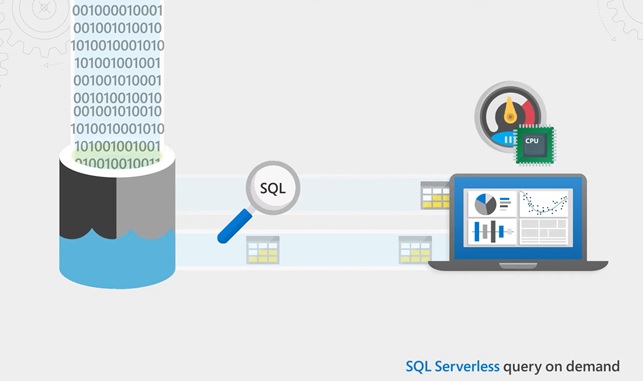
Moreover now it is possible to query on demand…

Authentication and Security – Azure Synapse Analytics supports both SQL Server authentication as well as Azure Active Directory. Also you can configure a RBAC strategy to access data with less privileged principals.

Finally, even you can implement MFA to protect your data and operational work.

In the next post, i will show you how work other pieces and components of Data Cloud solutions and the great benefits they bring in cost-savings and technical advantages..

See you them…

Agrotech – A new revolution is coming to Europe´s farmlands and crop zones..

Where is the opportunity?

There are large areas of land dedicated to the same crop which means an increased risk to pests and greater efforts in the fight against them. There are many plantations of corn, vines, fruit trees or simply cereals where the soils support a tremendous demand in giving the appropriate results to the farmers and growers. In the case of Spain, southern areas such as Almería produce tons of vegetables, fruits, plants of all kinds with significant water pressure since they are places where there is little rain.

Adding to that. we are facing significant rural depopulation in countries such as Italy, Spain, Portugal, France and further east Europe like Romania, Bulgaria, etc. Older people are left alone in rural settings. Moreover, young people are less and less present in those small villages and medium-sized towns surrounded by a lot of farmland.

We need an urgent answer and it is “Control” and “Automation”. We need efficiency even though we have a small staff to take care of undesirable insects, floods, droughts and fertilizers.

Why public cloud with IoT native tools and Edge computing brings the solution..

On one hand, IoT brings efficiency to the growers and farmers so they know the best moment in the season for sowing, irrigating or harvesting.

On the other hand, provide a forecast to them and a series of historical data to be able to improve their answer in the future.

Finally, you don’t need too much people to take control on vast cereal extensions for example. Even more you can program some tasks to be done automatically following a pattern of conditions.

What Offers the public cloud providers …

This picture (based on Microsoft Azure approach) shows what could be a IoT solution for Agrotech.

  1. Sensors provide data and with the help of Edge nodes which are responsible of data processing, routing and computing operation, reduce latency and provides a first repository for the data to be transmitted to the cloud. Sensor works with lots of several data formats mostly not structured but also some based on tables and well structured.
  2. IoT Hub is in charge of ingest data from the Sensors. It can process data streaming in real-time with security and reliability. It is a managed cloud solution which support bidirectional communication between devices to the cloud or the cloud to the devices. That means that while you receive data from devices, you can also send commands and policies back to those devices, for example, to update properties or invoke device management actions. It can also authenticate access between the IoT device and the IoT hub. It can scale to millions of simultaneously connected devices and millions of events per second https://docs.microsoft.com/en-us/azure/iot-hub/iot-hub-scaling and be aligned with your policies in terms of security https://docs.microsoft.com/en-ie/azure/iot-hub/iot-hub-security-x509-get-started, monitoring https://docs.microsoft.com/en-us/azure/iot-hub/monitor-iot-hub or disaster recovery to another region https://docs.microsoft.com/en-us/azure/iot-hub/iot-hub-ha-dr.
  3. CosmosDB it is a globally distributed, multi-model database that can replicate datasets between regions based on customer needs. You can tailor the reads&writes of the data in several partitions at a planet scale even if you want. https://docs.microsoft.com/en-us/azure/cosmos-db/introduction . This multi-model architecture allows the database engineers to leverage the inherent capabilities of each model such as MongoDB for semi-structured data (JSON files or AVRO can be perfect here), Cassandra for wide columns (for example to store data for products with several properties) or Gremlin for graph databases (for example for data for social network or games).. Hence, it can be deployed using several API models for developers. In our scenario can be use as a way to analyze large operational datasets while minimizing the impact on the performance of mission-critical transactional workloads https://docs.microsoft.com/es-es/azure/cosmos-db/synapse-link. Besides this powereful database solution, we can use Azure Synapse which is key in the transformation of the data. It is a new Azure component where you are able to ingest, prepare, manage, and serve all the data for immediate BI and machine learning needs more easily. It use Azure Data Warehouse to store historical series of data. https://docs.microsoft.com/en-us/azure/synapse-analytics/overview-what-is Uses Massive Parallel Processing (MPP) to run queries across petabytes of data quickly integrating Spark engine to work with predictive analytical workloads. Azure Synapse Analytics uses the Extract, Loads, and Transform (ELT) approach. Once we have used ML, streaming or batch processing of the data ingested before it´s time to report our information according to the growers or farmers needs.
  4. Presentation Layer. You can visualize the data for example with Power BI integrated with Azure Synapse. https://docs.microsoft.com/en-us/azure/synapse-analytics/get-started-visualize-power-bi

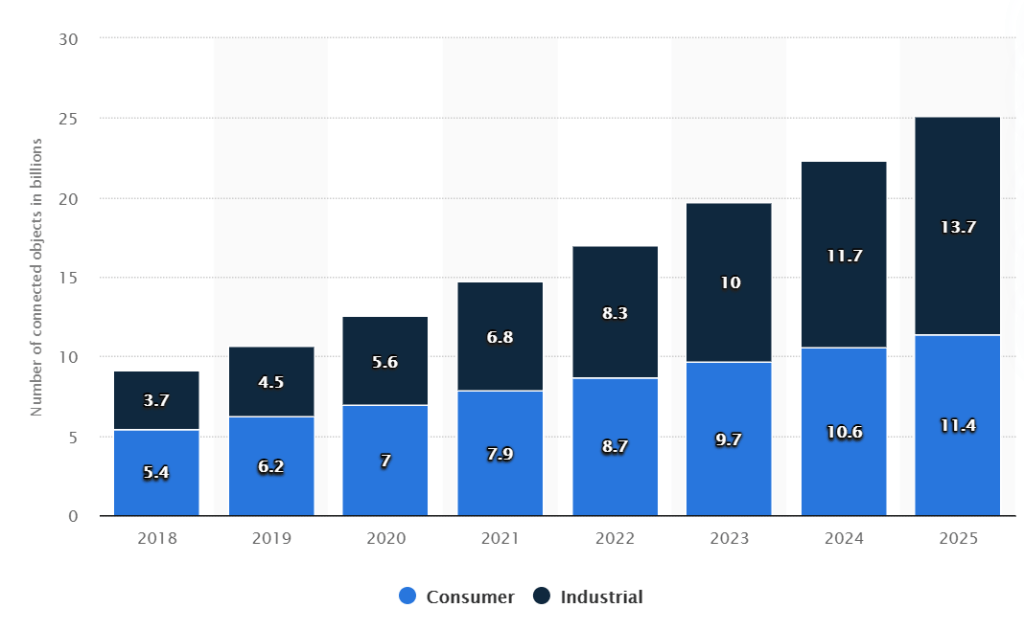
To summarize, IoT market is increasing rapidly. It is expected about 25 billion connected objects worldwide in 2025 following Statista.com information. There is a major opportunity to transform our society and enhance our agricultural sector.

See you then in the next post…

Fast and Furious: Azure Pipelines (2) deploy your Infra and Apps or releases with automation..

Living in a world faster than ever, tools focus on provide infrastructure, applications, mobile apps in an automated way are not important but crucial to survive in a market where companies change their strategies from a week to the next. One region can be a first product market for a company today, but tomorrow it´s a different one.

Devops platforms for the most important providers assumed the principle as native. Azure Devops is focus on CI/CD as many of its competitors but include one secret weapon: flexibility to deploy infra and apps in a question of minutes anywhere, anytime..with reliability and control.

Azure Devops has compatibility with Terraform: https://azure.microsoft.com/en-us/solutions/devops/terraform/ with Ansible: https://docs.microsoft.com/en-us/azure/developer/ansible/overview as a way to provide IaC (infrastructure as code). But also can facilitate its own ARM templates https://docs.microsoft.com/en-us/azure/azure-resource-manager/templates/add-template-to-azure-pipelines to create the infrastructure previously needed to deploy the mobile APPs or releases to sell our products in the new target market.

Finally and quite interesting as a Software Company you need to ensure that your code is secure and safe of bugs..so you don´t make the life easier to hackers or governments who are more than happy to know your pillars in the market, your most important technology or science secrets.

To solve such a problem you can integrate in a very flexible manner tools like SonarQube: https://www.sonarqube.org/microsoft-azure-devops-integration/

Be aware that this is real and the last case happened to Solar Winds just some days ago of publishing this post, provoking a big impact in US security: https://www.reuters.com/article/us-global-cyber-usa-dhs-idUSKBN28O2LY

So after this clarification, let me tell you Azure Pipeline can reduce your technical debt (impact you have if you are programming your code a lot of times by choosing an easy and limited workaround causing delay and security holes and performance issues instead of using a better approach from scratch) as well as improve the speed to deliver anywhere, anytime.

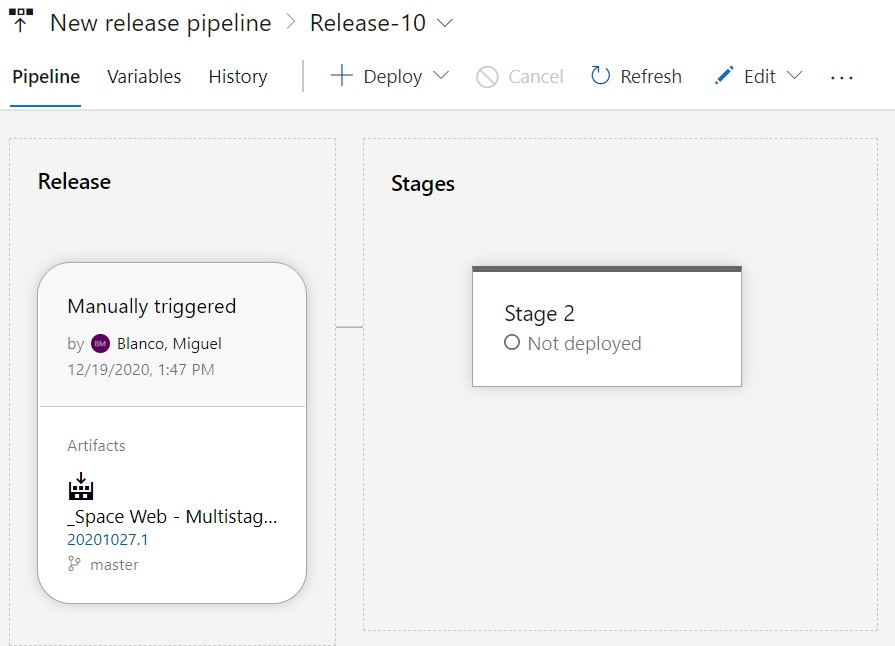
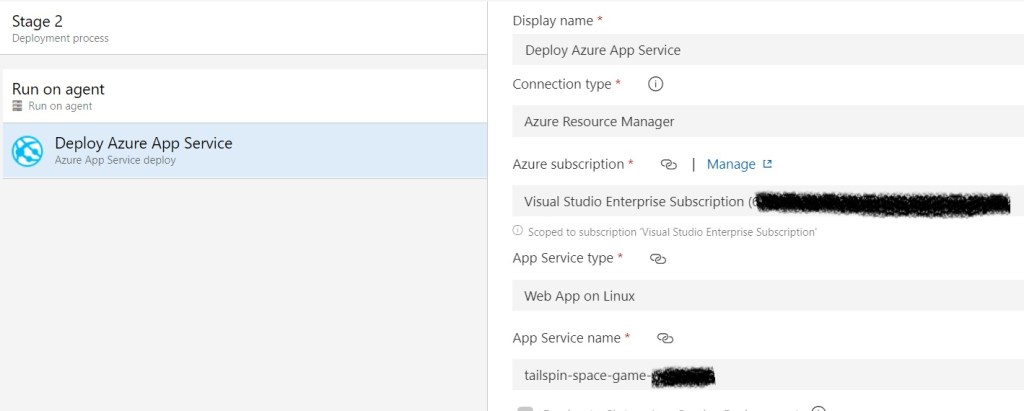
So we are going to create a new release and choose an scenario i´ve created previously on Azure where we have just a simple WebAPP on a APP Service plan F1 which is free as it´s just a small lab.

We hit on “create a new release” ..and choose our infra in an Azure Tenant..this is opt to you..and the build we want to deploy over there..

Right now we have prepared our build and the infra where we want to deploy the software or release..

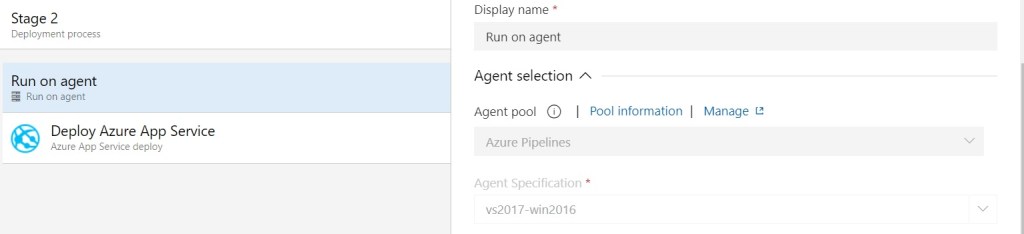
Just to remember, Microsoft provide two type of agent to run the jobs in charge of compile the code or deploy the releases:

Microsoft hosted agents, those run in Azure by Microsoft to support your software projects.

Self-Hosted agents, those that can be installed on a VMs or prem or a different private cloud for example to support the software projects.

We run here a Microsoft Azure agent:

We have the infra ready on Azure as well:

Finally hit on “Deploy”…and the magic happens..

You can see a sample Microsoft Lab website appear on the WebApp quite quick..

With this post we finish a global view to Devops from the Microsoft perspective. A solid respond to current times that solves many of the software life cycle challenges.

Enjoy the journey to the cloud with me…see you then in the next post.

Azure Monitor: a holistic approach to take control on your data

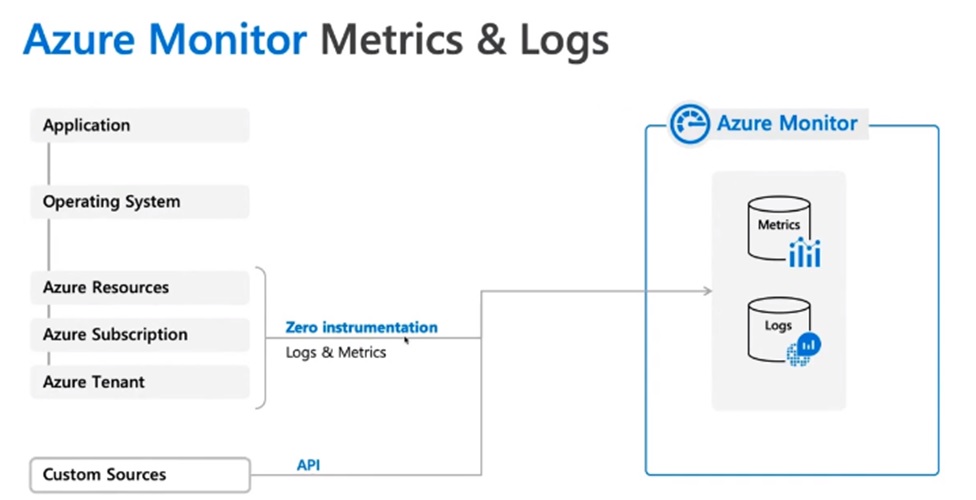
Each native operational cloud tool provide a tremendous value that many people don’t see when they start with the public cloud. Some of them are focus on provide a backup approach, other facilitate assessment or discovery of workloads to be migrate, even security or just watch up specific metrics or KPI. This is the case of Azure monitor, a holistic monitor tool to configure customize dashboards with the most important technologies you are working with daily.

Platform logs provide detailed diagnostic and auditing information for Azure access and use the Activity Log to determine the whatwho, and when for any write operations (PUT, POST, DELETE) taken on the resources in your subscription.

Azure Active Directory logs contains the history of sign-in activity and audit trail of changes made in the Azure Active Directory for a particular tenant.
Resource Logs provide insight into operations that were performed within an Azure resource, for example getting a secret from a Key Vault or making a request to a database. The content of resource logs varies by the Azure service and resource type.
Send the Activity log to a Log Analytics workspace to enable the features of which includes the following:

1. Correlate Activity log data with other monitoring data collected by Azure Monitor.

2. Consolidate log entries from multiple Azure subscriptions and tenants into one location for analysis together.

3. Use log queries to perform complex analysis and gain deep insights on Activity Log entries.

4. Use log alerts with Activity entries allowing for more complex alerting logic.

5. Store Activity log entries for longer than 90 days.

Also great news!, no data ingestion or data retention charge for Activity log data stored in a Log Analytics workspace.


In the next post, we´ll explain how to monitor virtual machines and what is more important, applications and web services..

See you them…