What happens when the cloud adoption is more than that?..do you have a cloud strategy based on your IT profile?

We all think that there are 3 possible stages on your journey to the cloud

Those companies, digital starters, looking for advisory to start moving some workloads to the public cloud from their on premise or private cloud infrastructure. Those companies, called digital expanders, with some experience already on the public cloud and satisfied with the outcome of a first cloud adoption on those projects. Finally, those digital leaders, maybe native or not on the public cloud, but with important investment on OPEX and very focus on the business motivations and the outcomes to be cloud first in almost all they do.

But what happens if we change our perception?..if we think there is a conservative IT profile, a moderate IT profile or even an aggressive one in terms on how to leverage cloud native technologies ?

On one hand, another factor to be evaluated it’s not just how to prepare the cloud adoption with methodologies like CAF. But also to understand that not all the companies need a Data Analytics platform or an IoT solution. At least, during the coming years..

On the other hand, how can you reflect those cloud flavours and the cloud native technologies on the real world?..well we can start with this full picture that came to my head sometime ago..

Depending on your IT profile you will be working on some of these cloud flavours

This picture (based on Microsoft Azure approach) try to represent that there are several technologies that we can group by cloud strategy and associate with an IT profile.
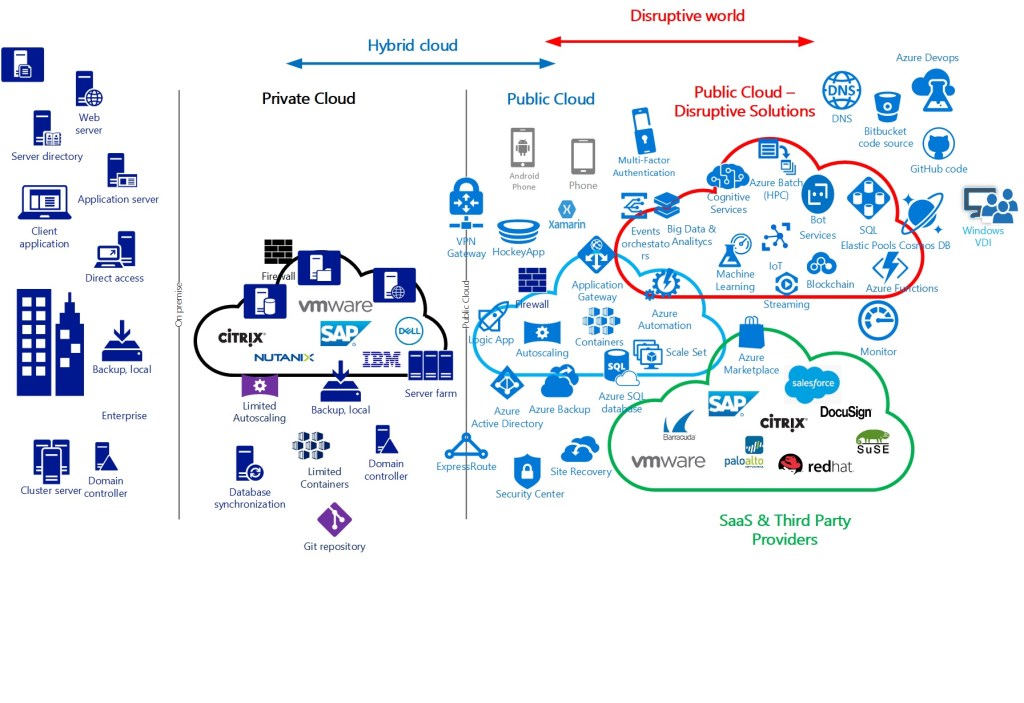
My cloud vision based on technologies and cloud strategies

A conservative IT Profile – Would be a company mostly base in traditional infrastructure with storage, backup or archiving as most important priorities as well as some VMs or LOB applications. A sector like banks and finance institutions are well represented here. Actors like hardware providers are still supporting on their on prem and private cloud platforms. Also, they have a big investment on leader hypervisors, complex computing technologies, and use some scalability with containers and autoscale sets but limited for their own resources. User Experience and usability on their APPs is not a strong point and automation on processes with RPA, or use modern Devops platforms is also not very extended on those companies. They have lots of legacy applications and monolithic databases, old data warehouse and traditional ERPs.

Conservative IT Profile

A moderate IT Profile – Would be a company which is more focus on providing an APP or an ecommerce platform with almost no downtime and escalation based on seasonal products. Maybe even they are migrating some specific workloads to bring innovation, to work on a global way with other subsidiaries or to leverage the potential of some disruptive solution like bots to improve the User Experience for their customers. The hardware almost disappear in this kind of companies. They have a hybrid model solution and are starting to embrace the disruption on new cloud native solutions like are cognitive services, machine learning or data analytics. -They are even integrating SaaS technologies like Docusign, use the marketplace to replace some thirty party products that before were present on the previous on premise data center, they had. An example of this profile can be retail companies offering a new online shopping experience, etc.
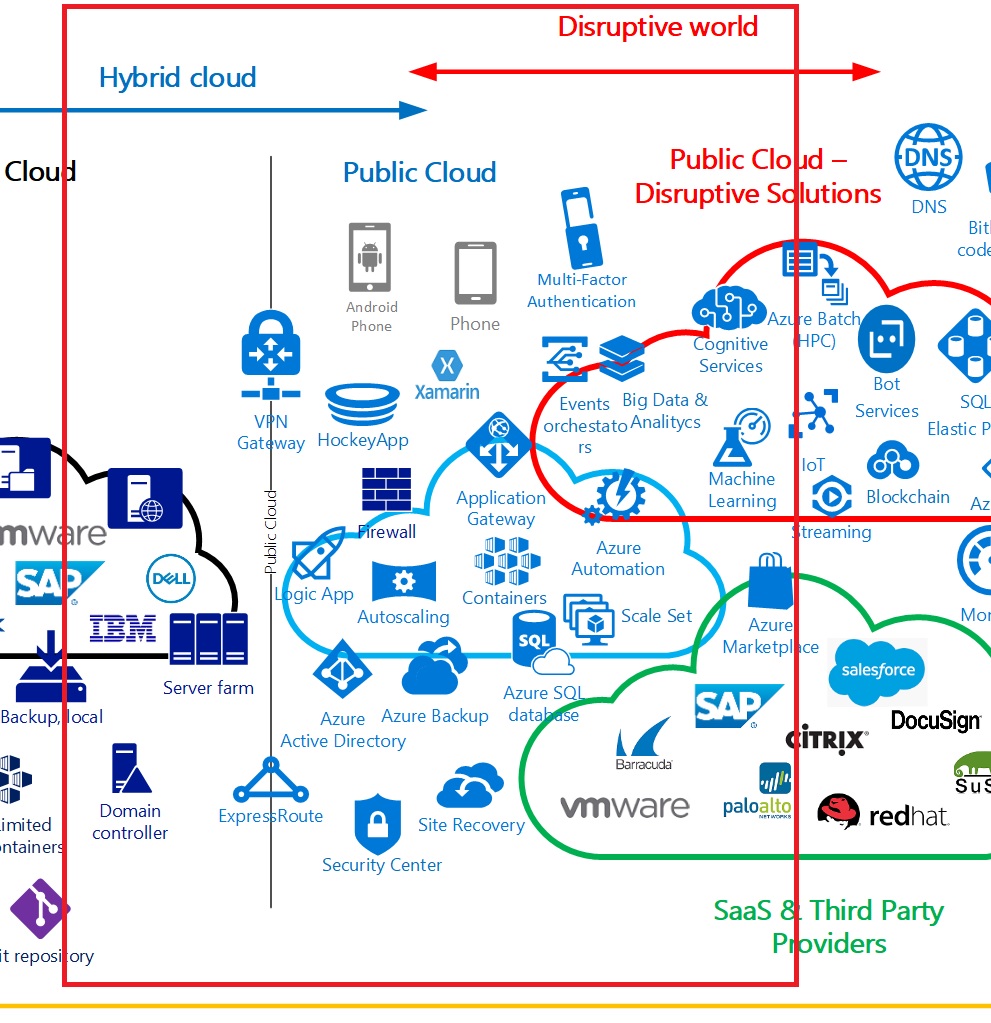
moderate IT Profile

An aggressive IT Profile – Be cloud first. All they want is working on the public cloud when possible as they learned a lot on the benefits and the outcomes when they CAF and the progressive migration of workloads are well-architected and well defined. They have a tremendous knowledge on leveraging disruptive technologies, save cost, provide the right governance and security and achieve their goals. These companies are very dynamic, use agile methodologies, have clear priorities on accelerate the daily processes, the business and improve the employees and customers experiences. Innovation is their mantra. Here you will see startups like fintech, healthtech,etc. You will see the enterprise vertical on renewable energy companies, insurance or in the chemical and pharmaceutical industry. They use data analytics and Big Data massively, ML, PaaS and Serverless and modern devops platforms. They reduce investment on hardware and licenses as well as integrate SaaS, block chains and other technologies in the daily user experience. Also, they provide APPs and remote work to their users.
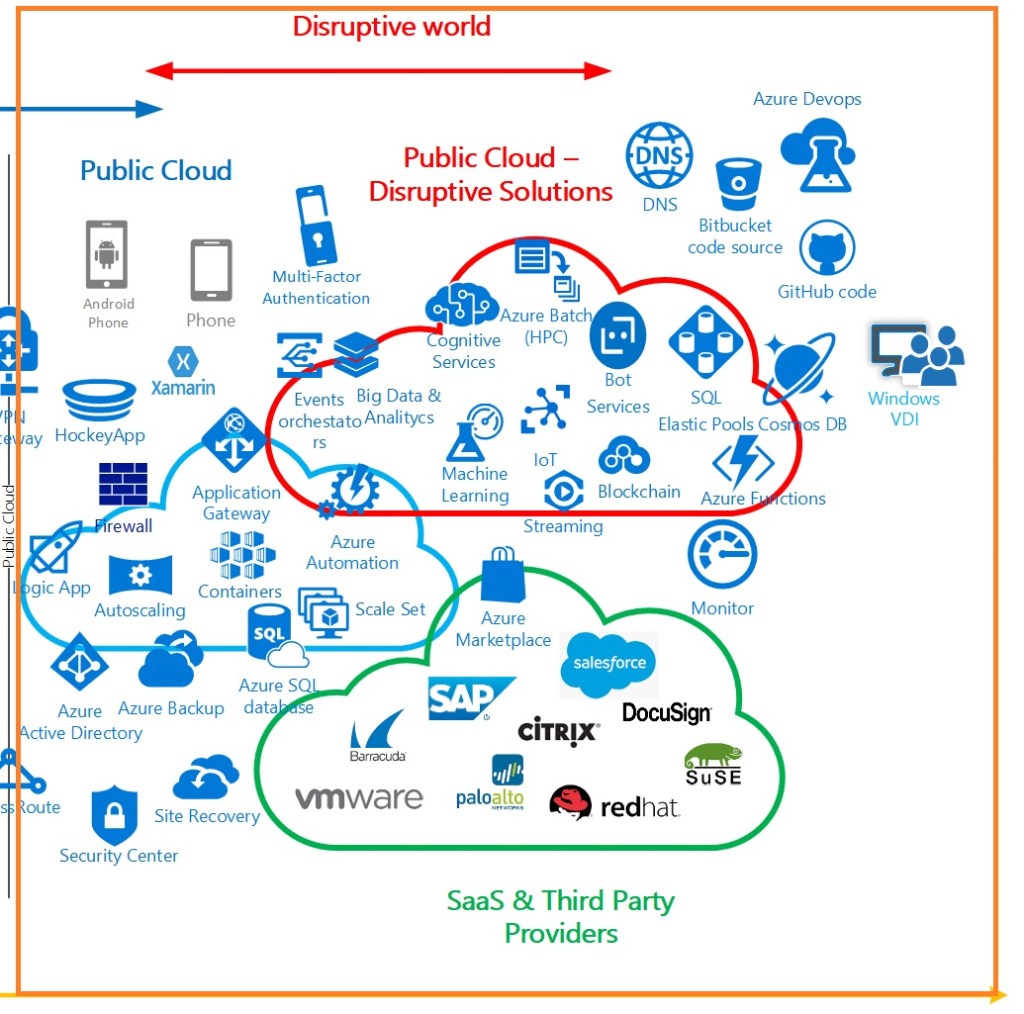
Aggressive IT profile

To summarize, this post just try to show that there, outside, adopting the cloud, each company, each public institution have their own hat and they can tailor the technologies to their needs. Finally, not all the companies of each vertical or business are fit with these descriptions but without stereotyping, it is a way of defining types of companies that will soon or later make use of the benefits of the public cloud.

See you then in the next post…

Your code and your builds from anywhere, anytime – Azure Repos and Azure Pipelines (1)

It’s not magic, but a very versatile tool that can provide all you need to work remotely on you Continuous Integration. If you want a repository with security, SSO and integrated with the best tools to work on your builds, if you want a solution to automate the builds as well as the releases, you are in the right post.

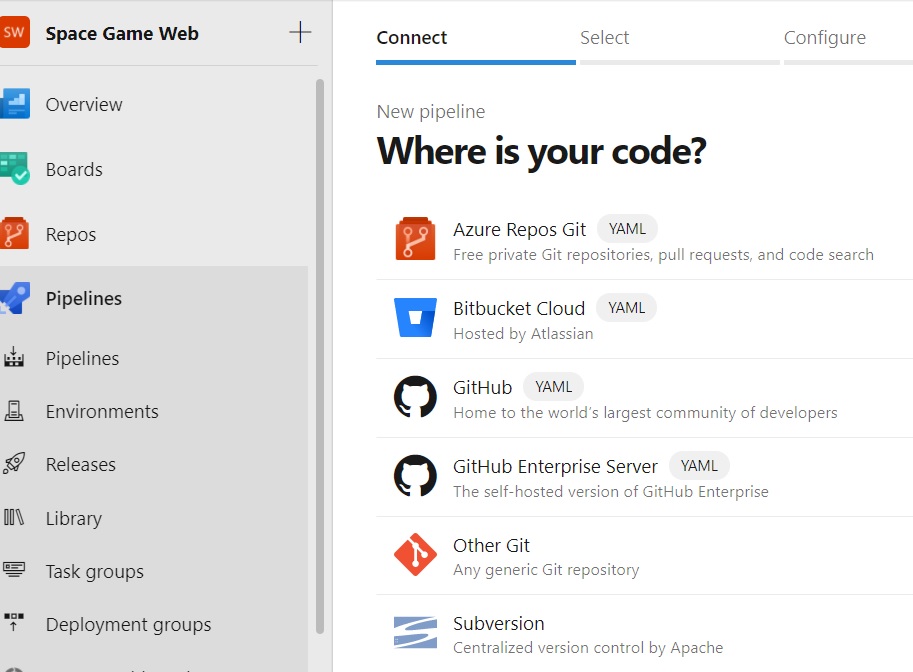
First of all and somehow starting from the end, yes the end, you can choose Git, Github, Bit bucket (Atlassian), GitLab, etc as the origin of your code to run builds. Yes, it is opt to you where you have your code. I wanted to pointed out this to show you how flexible is the solution.

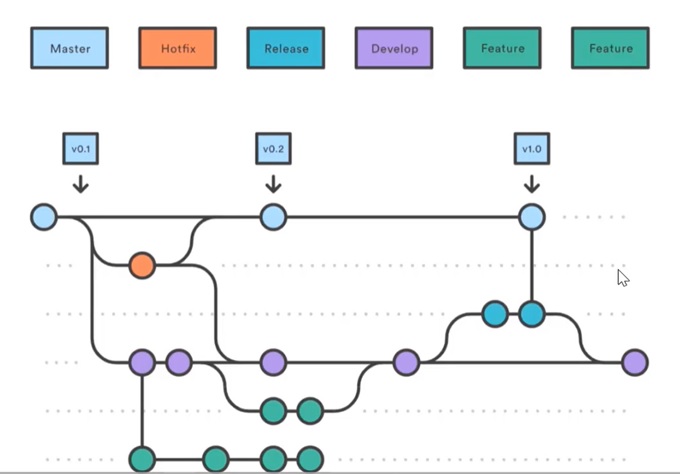
So after this clarification, let me tell you Azure Repos has by default a Git repository. You will use a Gitflow repository approach where you have the master branch on Azure repos and several branches for developers to solve issues, develop new features or fix a bug on a distribute way.

So after a pull request and some specific branch policies that maybe or maybe not you can put in place and the approval of several stakeholders involved in application development, you will merge your code with the master one on the cloud, on your azure repos for this specific project.

On repos you can maintain the code, json file, yaml files, clone, download or do some changes from your Eclipse or Visual Studio client for example.

Furthermore you have the tracking of commits and pushes done in your project code as well as a correlation of all the branches right now active.

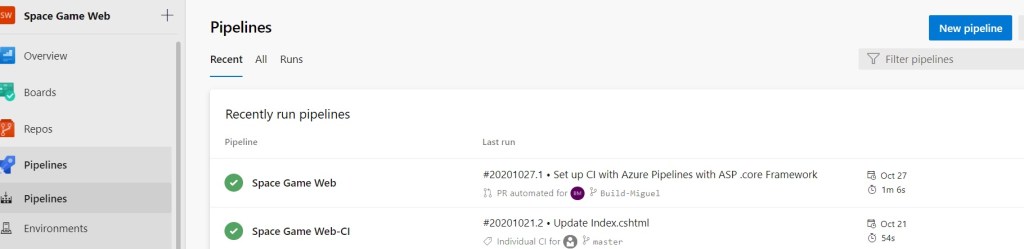
On a perfect strategy with your builds you can prepare a new one in a very easy way…just hit on “New Pipeline”

Choose as i´ve told you at the start of this post where is your code..

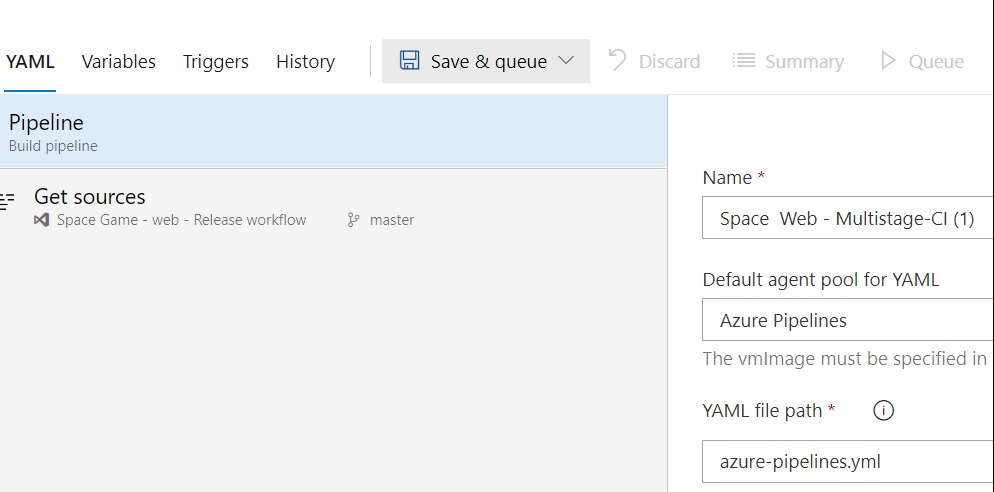
Let’s say we are going to use a Yaml file. A Yaml file is nothing else than a data-oriented language configuration file where you describe all related to the application that you want to compile. As a run time, programming language and package manager to include some specific libraries..for example.

And finally save and run your build. In this case, it will be roll out manually but you can configure automation and trigger a code compilation after some changes in the code and maybe some approvals from you Project Manager.

So then if you want configure a trigger for the automation…just configure depending on your needs the triggers tab..and that´s all.

In the next post i’ll follow explaining more about azure repositories and azure pipelines so you can see the tremendous mechanism to accelerate the Continuous Deployment for the top developers performers companies.

Enjoy the journey to the cloud with me…see you then in the next post.

Work as a team on Covid times – Azure boards

Developers, Project managers, stakeholders during an application modernization project are the pillars to create a real powerful APP. This in previous times to Covid was still a challenge and now even more. Are you developers disconnected?, are your teams more than teams a silo? .

There is a component quite important within Azure Devops called Boards. This component is part of your solution as you can roll out Scrum or agile approaches quite easily to your developers and stakeholders .

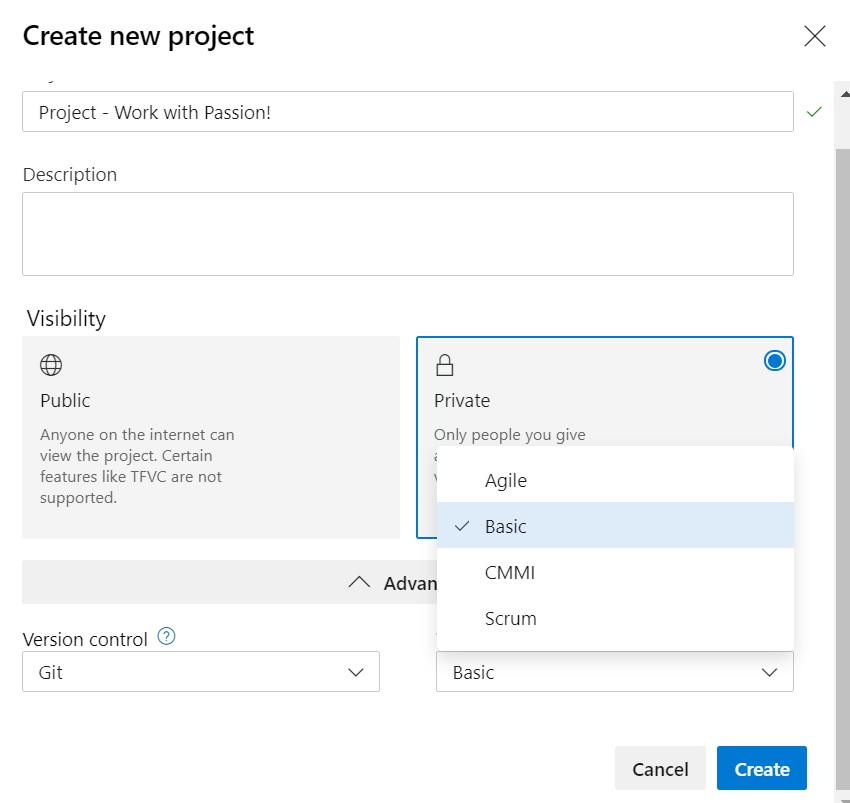
So within your Organization on Azure Devops, click on new project. you can choose between a private one (requires authentication and it´s focus on a team) or public (and open source development for the Linux community for example).

So when i start a project, i can choose the methodology and strategy to follow up my project and foster collaboration?

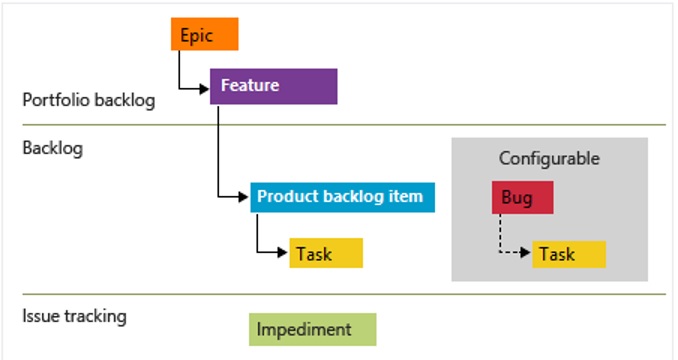
Azure Boards support several actors: user stories, tasks, bugs, features, and epics. When you create a project, you have the option to choose if you want a basic project with just Epics (the goals that you would like to achieve. Let’s say), Issues (what kind of steps should be follow or milestones) and Tasks (they are included per Issue and means the lists of points you need to execute to get the issue done) or Agile, etc. You can then assign all these items to several people and correlate those efforts on several springs.

So you can create work items to track what happens on the follow up of your development. You can coordinate and motive your team to solve delays, problems and  you would be home and dry.

On one hand, you have all the developers working remotely on this tough times and using SSO as Azure Devops is integrated with your Azure Active Directory.

On the other hand, you can invite as guest other employees or users to access your projects if they are private. Keep in mind that you can even create public projects to open software as i mentioned previously.

Let’s see how a project manager can track an application using a Scrum approach. On the Epic you will establish the goals: some business requirements or maybe an specific enhancement to the Application. To achieve that the team will work on a Feature with a bunch of Tasks to be done. Also all this effort will be tracked on boards.

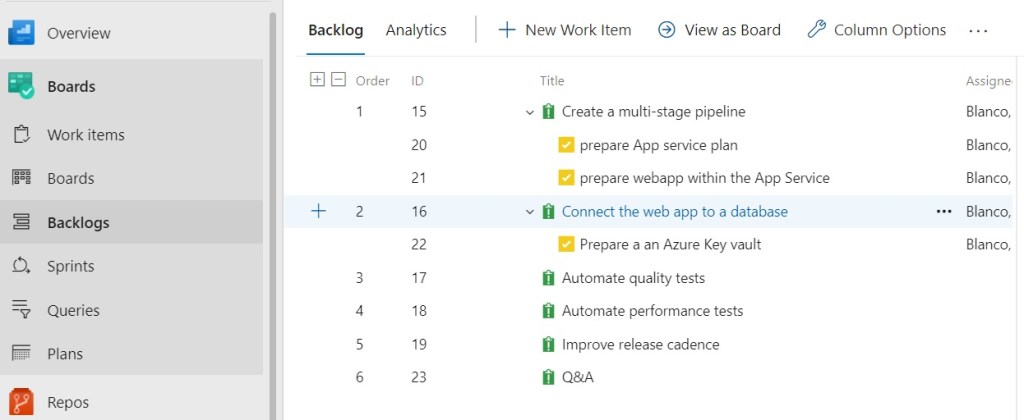
So in this case of an Agile project you can use an approach like this one where you have a goal or Epic a “New Web Service Version”, you have some user´s stories like project manager or developers and obviously some issues which involves tasks to be done.

For example, create a new CI/CD process with a pipeline where you will deploy the releases on a Web App (with an slots for staging, production or development).

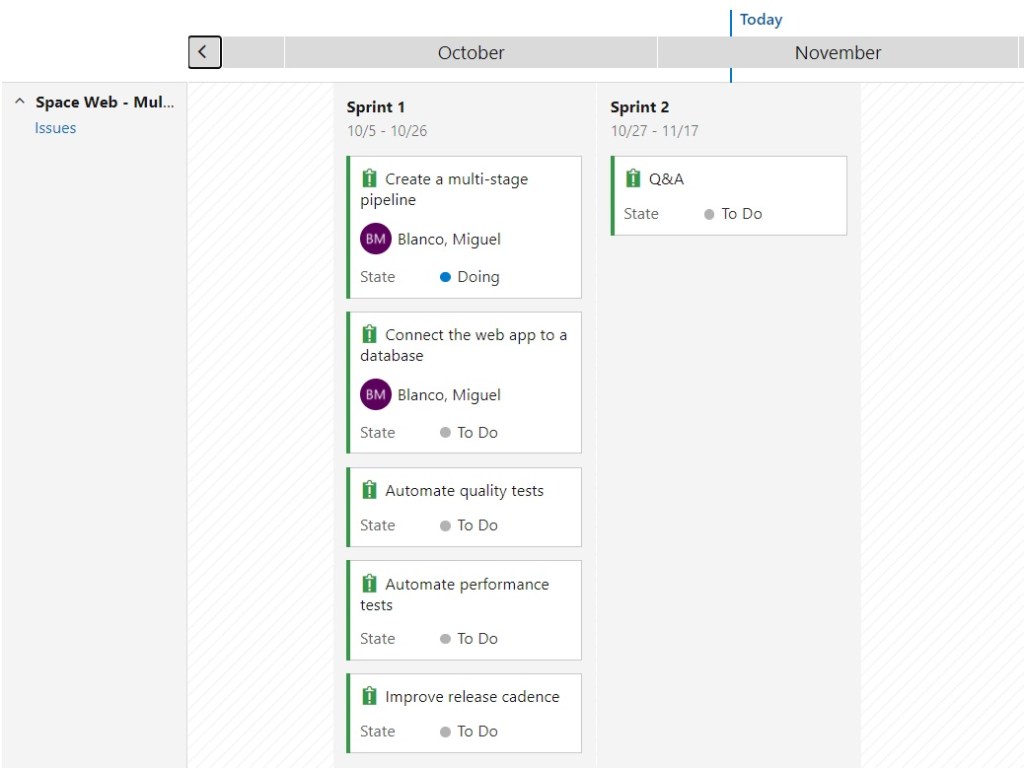
Also, you can see this process including the issues or the tasks associated in each sprint. You will have as much springs as needed to achieve all the goals on the final application release. To show that just check Sprints within Azure boards. Take into account you need to determine with steps or issues/ tasks should be done on each of those springs.

Finally, pay attention to identify the timeline of your springs so the project manager can detect delays and help the team to progress properly.

Adding Azure Boards to a Tab within Teams to foster the collaboration between the stakeholders bring a lot of potential as make very flexible the access, the follow up of the project and checking of every milestone.

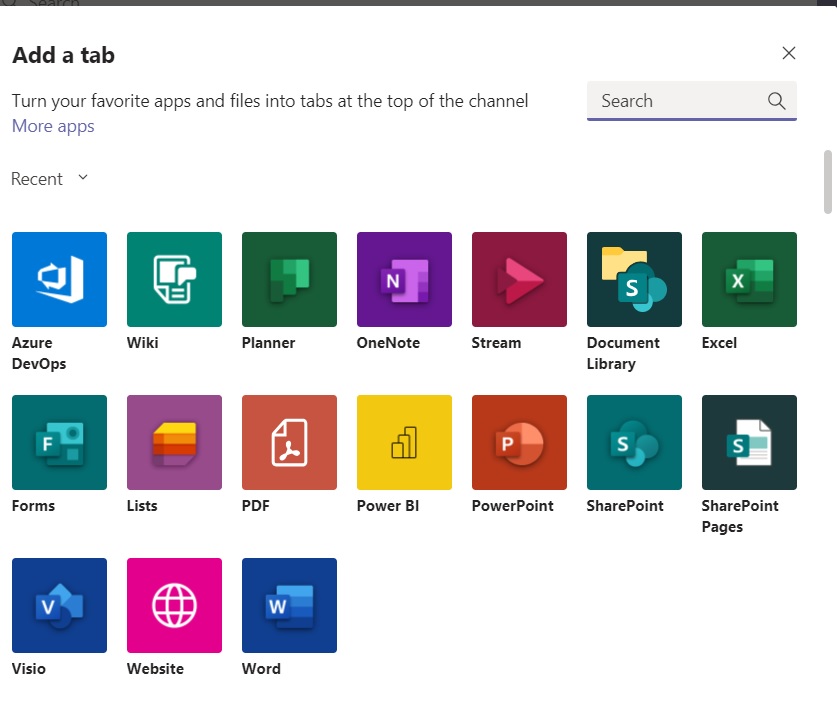
On Teams you can add a new tab and choose Azure DevOps…

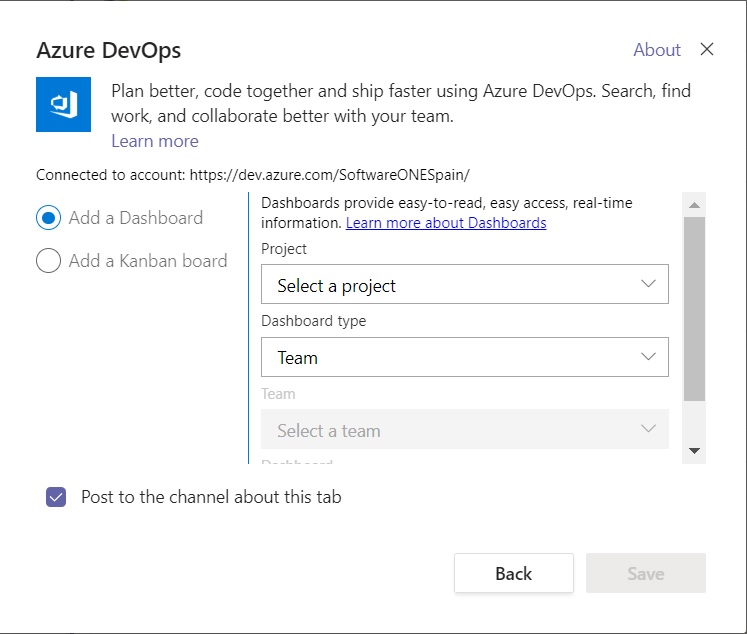
When selecting the app, you can choose the organization, project and team..

So once you have selected all, you can hit save..

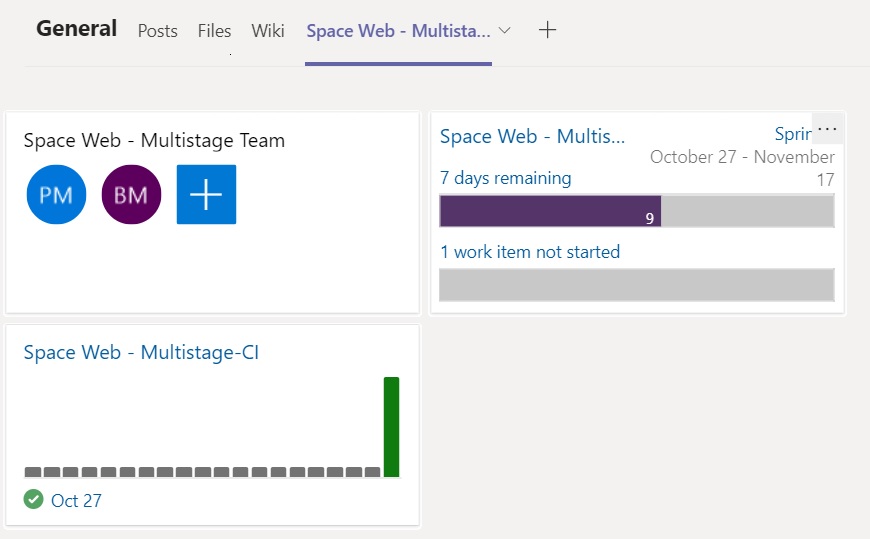
Now as a project manager, you can stay on the same page with a few clicks.

In the next post we’ll show and explain more about azure repositories and azure pipelines so you can see the tremendous mechanism to accelerate the Continuous Integration for the top developers performers companies.

Enjoy the journey to the cloud with me…see you then in the next post.

Azure Devops integrates all in one

The current landscape is full of companies with a little mess in terms of software life cycle. I mean, different repositories, several control version approaches, open source not clearly identify in some cases, several programming languages and packet management and even the CI/CD strategy can change a lot from one application to the next.

What happens here brings delay to deliver releases, developers team miscommunication, fixes for bug not clear, builds are a pain, springs extended for more than expected, poor software quality with scarce testing and in general risk on the code security.

Why Azure Devops?

Azure Devops provide all that is needed in order to cover repositories integration, tools to review the quality of the code, big actors from the open source world like Jenkins a friendly approach for several packages as NuGet, npm and Maven. Even the operational maintenance can be done with Microsoft solution as Azure monitor (Insight is now a component), Azure security center, azure policy, etc. Or even if you want you can use Nagios, splunk or Zabbix.  

If your team works mainly with Eclipse, jenkins, selenium, sonarqube, even with Jira you have a full and flexible integration with Azure Devops.

If your team works with Visual Studio and you have MSDN subscriptions you can get azure devops users subscription for free. It sounds good, isn’t it?

But what benefits in a nutshell can bring Azure Devops to our company?.

  • Timely Access to New Features

Every three weeks, DevOps users receive access to new features.

  • Remote cloud accessible anywhere, anytime, SSO

Users can access anywhere, anytime, without VPN and with SSO and MFA. So with security but adding mobility and flexibility to work remotely.

  • No Upgrades to Worry About

Users need not worry about upgrading or patching up the toolchain because the Azure DevOps is a SaaS product. Companies that run on a CI/CD model no longer need to slow things down for the sake of upgrading.

  • Reliability

Azure DevOps is backed by 24 x7 support and a 99.9% SLA.

  • Flexibility

If your DevOps team doesn’t want or need the full suite of services,they can acquire the specific components needed to fulfill your expectations. Even it´s possible to integrate Open source solutions if requiere as we´ve mentioned and other competitors as well.

  • It’s Platform-agnostic

DevOps is designed to run on any platform (Linux, macOS, and Windows) or language (Android, C/C++, Node.js, Python, Java, PHP, Ruby, .Net, and iOS apps). Woowowww!!

  • It’s Cloud-agnostic

Azure DevOps works with AWS and GCP.

In the next post we will show and explain the components within this solid and strong developers platform.

Enjoy the journey to the cloud with me…see you then in the next post.

Any Company is a Software Company. Why devops matters?

Any company needs software to support its processes, its daily work and the systems which interact with their customers and partners.

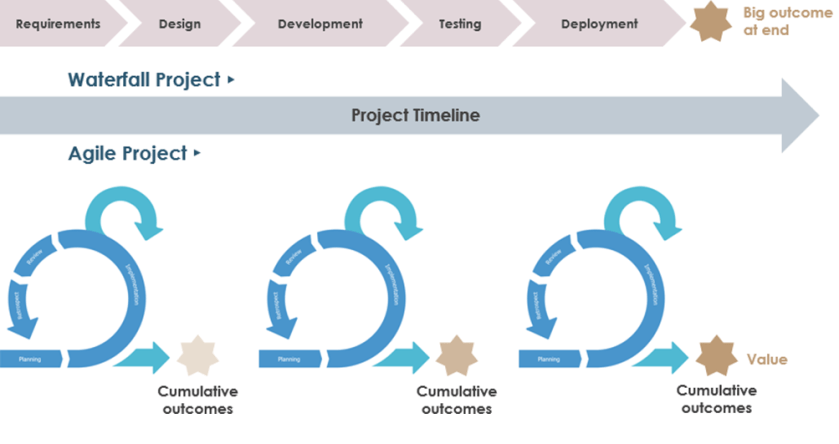
Many companies don´t know how to fix the gap on their software needs and have lots of repositories, even more than one version control platform, eternal development cycles with more than a programming language, some build and tests tools, and to increase the risk, using waterfall traditional phases to achieve a final software product release.

In addition, there are in many scenarios some silos developing several software solutions in response to several areas of the same business overlapping efforts, not collaborating with other teams properly and not empowering the developers and stakeholders with a flexible, anywhere-anytime distributed devops cloud approach.

The most important leaders on the market focus on Devops and also providing an approach on CI/CD are Atlassian Jira and Microsoft Azure Devops..

There are some devops products on the market helping or supporting Agile or Lean methodologies to be apply on their software development. Some of them are focus on just collaboration, team work and facilitate user stories, backlogs and work items to Scrum Masters or Key developers. Some also are focus on provide control version, integrate Git-flows strategies or improve testing.

But, to be honest, those ready to provide a CI/CD strategy with their own tools or integrating such solutions as Jenkins, CircleCI or Octopus with efficiency are just these two market leaders from my point of view.

Azure Devops is off-road. It can support SCRUM or CMMI with its component called Azure Boards, build packets with Nuget, NPM or Maven on CI with Azure Pipeline and at the same time deliver the release to Web Services or Containers on CD if needed. It can provide Test Scenarios or use open source such as Selenium or SonarQube to reinforce the software code in terms of quality and security. As everybody knows the source control -source version Microsoft repository bet it´s GITHUB an Git on Azure Repos.

Atlassian Jira can handle Agile while can be integrated with Azure Pipeline as well as their own CI/CD Atlassian Bamboo. As repository git management approach you can use Bitbucket. Even you can use Jira Service desk as their ITSM solution. It´s a veteran in the market and a very solid approach.

So when it makes sense use one or another?. It all depends on what you want to develop, what requirements should be take into account, dead lines, dependencies and if your origin is a legacy monolithic mono repository or a first cloud devops strategy.

Do you need a flexible cloud devops platform with powerful features to work remotely? without loosing security and improving collaboration with partners and customers?. Do you want SSO?. Then the answer is Azure Devops.

In the next post we will figure out what challenges we have to cope with on software development, quality, risks and best effort strategies leveraging Azure Devops to fix all in one.

Enjoy the journey to the cloud with me…see you then in the next post.

What is the CAF?. Finally, the Microsoft approach to the cloud adoption. (Part V)

In previous posts we´ve mentioned some particular points related the Microsoft cloud adoption framework (CAF). This one is about how the big titan use a different approach but literally very similar in terms of stakeholders as AWS does.

Let´s remember the most important steps for this methodology to adopt the cloud for their customers.

In the first post we just did an introduction on how Microsoft define their initial scope on the journey to the cloud taking three clear strategies: Business strategy, People strategy, Technology strategy.

Microsoft starts through guidance, tools and narratives based on previous experiences to shape these 3 strategies mentioned to prepare a cloud adoption plan.

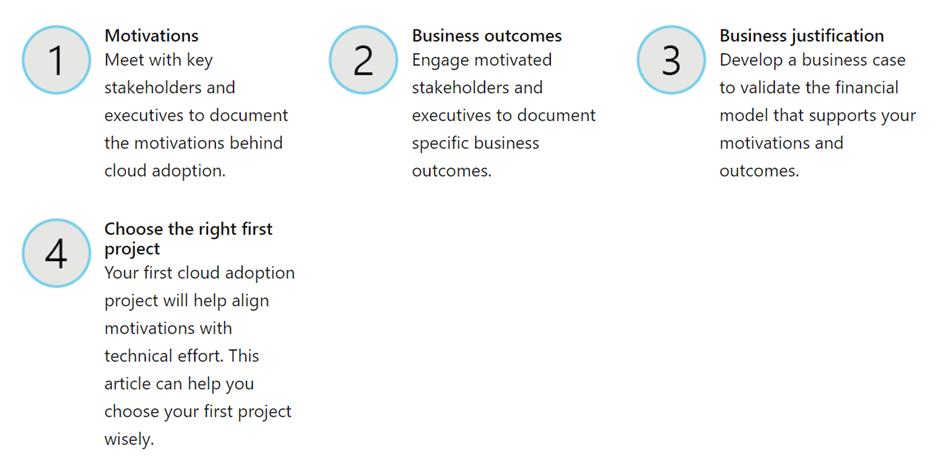
Business strategy involves in the process several steps together…where it is crucial to identify motivations and business outcomes through the correct understanding of company´s processes, the current technologies and the stakeholders. But Microsoft goes one step ahead as they start to prioritize a first workload sooner than AWS, “a first project” aligned with the previous analysis which provide a great value to determine if the public cloud covers the evolution that the customer is looking for.

This image has an empty alt attribute; its file name is ms-step-1.png

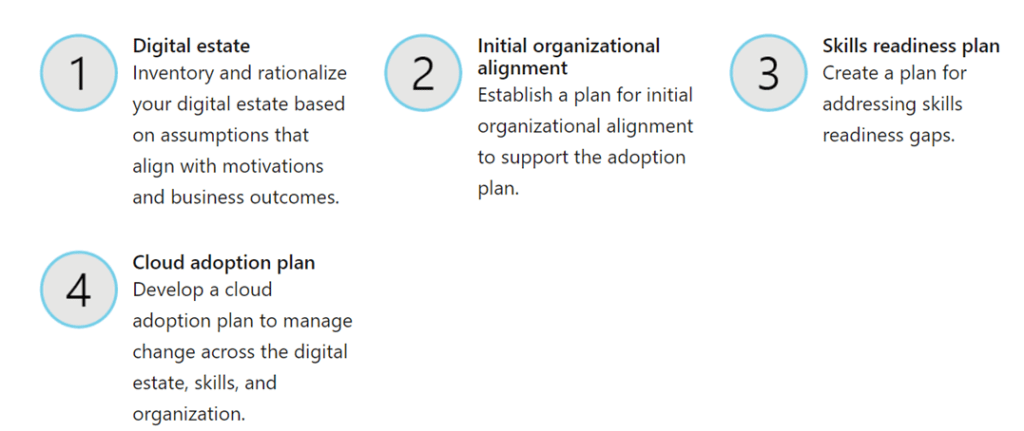
Afterwards Microsoft prefer to drill down a bit their steps to create their plan tailoring on three areas: Digital estate, initial organizational alignment and skill readiness. Then prepares its own cloud adoption plan based on the information and analysis done on these small steps.

This image has an empty alt attribute; its file name is ms-step-2.png

So let´s prepare what it´s called the digital estate. To evaluate that you need to identify some concepts in terms of costs.

  1. Cost Deltas which are fix cost. Some of them are very clear to identify or evaluate such as:
    • Software licensing.
    • Hosting expenses.
    • Electric bills.
    • Real estate rentals.
    • Cooling expenses.
    • Maintenance contracts.
  2. Cost Deltas no so clear and more variable:
    • Temporary staff required for operations.
    • Equipment rentals.
    • Replacement parts.
    • Repair services.
    • Business continuity and disaster recovery (BCDR) services.
    • Other expenses that don’t require capital expense approvals
  3. Revenue Deltas. Revenue deltas should be forecast in partnership with business stakeholders. After the business stakeholders agree on a revenue impact, it can be used to improve the earning position.

With that information you are going to calculate your Gain from investment.

And identify the ROI from moving on prem to the cloud with the follewing formula:

Comparing these expectations with the TCO estimation and your Azure consumption forecast for the workloads to prioritize and move to the cloud is also a good exercise to convince your finance audience, that you are in the right direction.

Another critical point to struggle with it´s “organization structure” and the upskilling plan for the employees.

The first step of managing organizational alignment is to determine how the following organizational structures will be fulfilled:

  1. Org chart alignment: Management hierarchies, manager responsibilities, and staff alignment will align to organizational structures.
  2. Virtual teams (v-teams): Management structures and org charts remain unchanged. Instead, virtual teams will be created and tasked with the required functions.
  3. Mixed model: More commonly, a mixture of org chart and v-team alignment will be required to deliver on transformation goals.

Beside these organization alignments you will address all the needs in terms of upskilling and provide training to your teams when they have to face with the first workload to be move to the cloud and the “Landing Zone” where you are going to prepare all the requirements in order to set up a management model, compute, networking, security, storage and interaction with other partners and cloud providers for your future IT solutions in the cloud.

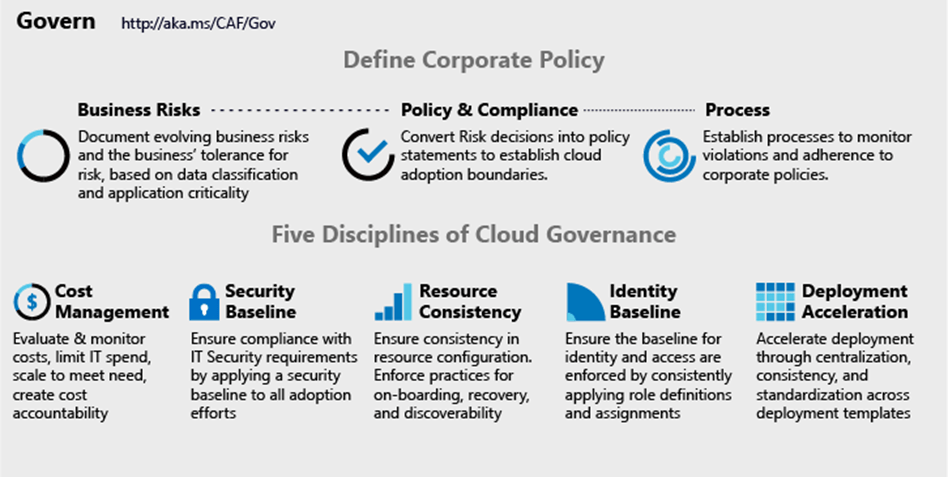
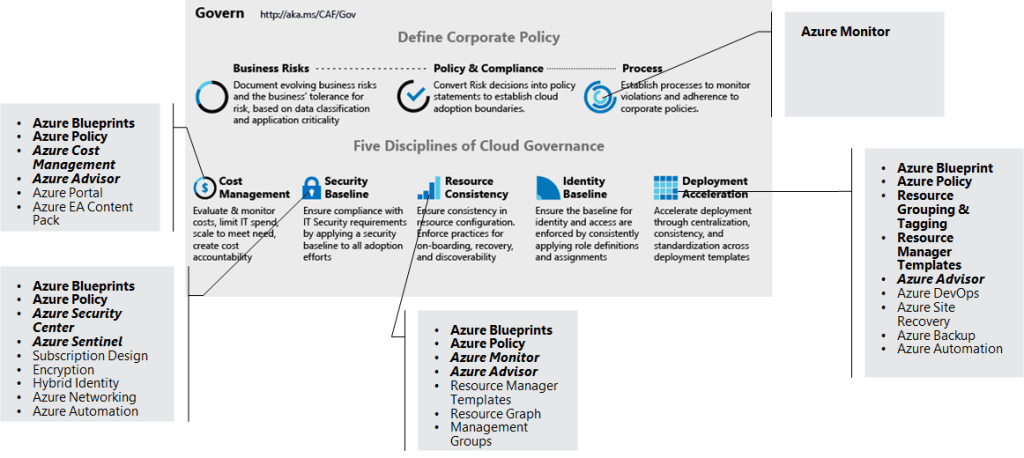
In this previous phase to the landing zone you will prepare, and that is a very important task to take into account, your governance model which can be provided with Microsoft tools or a mix between Microsoft & Thirty party solutions.

Let´s see how to roll out the approach with Azure native tools:

So just to recap, every modern company has some form of digital estate that includes legacy solutions and even hardware, virtual machines (VMs), servers with its dependencies, applications more or less critical, data more or less sensitive, networking, a identity management model and so on. Essentially, a digital estate for Microsoft is the collection of IT assets that power business processes and supporting operations. The first layer of your success in to sell and consolidate your market, to be more innovative or to get more quick wins that your competitors and with the right digital estate that will be solid as a rock.

On the coming post we will be focus on the “Ready” approach from the Microsoft point of view where we will explain the basis to deploy a “Landing Zone”, Microsoft best practice and migration tools from both cloud providers.

On the last post we will provide a global view of AWS CAF and Microsoft CAF in a final comparison table.

Enjoy the journey to the cloud with me…see you then in the next post.

What is the CAF?. Don´t cut the cake horizontally- AWS Technical Perspectives. (Part IV)

So we have identified the first perspectives more related to our business company: business perspective, people perspective and governance perspective. Now we will go on with the rest of AWS perspectives for the Cloud Adoption Framework which are more related to technical aspects that we need to take into account.

Once collecting all the information for these three perspectives, we´ll gather enough data to set up a clear Actionable Plan. With this in mind, we assume “Envisioning” and “Alignment” as steps already done in our AWS journey to the cloud. Afterwards we will be ready to afford “Launch” where we need a vertical slicing of the cake as AWS says. I mean, a prototype where stakeholders from different company´s areas are involved. With that way we reduce risk and we take advantage of frequent delivery of usable chunks for other workloads to be migrated later to the cloud.

Let´s go on then with the last three perspectives more technical and the stakeholders which are part of them:

  • Platform Perspective: Chief Technology Officer (CTO), IT Managers, Solution Architects.
  • Security Perspective: Chief Information Security Officer, (CISO), IT Security Managers, IT Security Analysts.
  • Operations Perspective: IT Operations Managers, IT Support Managers, Outsourcing partners which maintain the current applications and IT services.

Platform Perspective: This perspective will identify the needs of network, compute or storage provisioning to move the workloads identified on the prototype in the actionable plan. But also database, systems and architecture or application transformations needed to be more efficient solutions in the cloud. This second part is more complex as may involve CI/CD redesigning in some process or current software development.

Security Perspective This perspective shape the identity and access management mechanisms to provide access with double factor authentication, less privileges policies and granularity on permissions. Provides detective controls to gather logs and correlate them in the right way to get a real view of the security posture. Facilite automation security controls in the infrastructure based on the “Desired Configuration State” and finally how the data protection and incident response should be address on the prototype and afterwards in the next workload to be move to the cloud.

Operations Perspective: This perspective defines all the current processes in terms of maintenance and identifies the processes to be change and training needed to implement a successful cloud adoption. This is done in terms of monitoring, business continuity strategy like backup or disaster recovery, patching and general operational daily task to be changed, replace or remove for the IT Staff within the company.

Therefore, with the six perspectives templates filled out and a lot of information about each business area, current processes and skills, we are ready for starting with our action plan. Let´s go with the next step that we´ve mentioned in the introduction in this post.

Launch the first workload or you prototype is the armageddon of your digital transformation within the customer´s company. You should be able to understand their business from A to Z.

To get the best from east and west use the “Vertical Slicing strategy of the cake”. That means you´ll involve as much stakeholders as possible from several areas with less or more impact to get absolute visibility of the transformation, the innovation that you bring to them and how you accelerate the outcomes. Also, that reduces the risk of the effort done, improves the perceptions in the whole company, and facilitate the frequent delivery of usable chunks for new migrations.

Vertical Slicing of the cake

Remember the work streams (current processes and skills to manage them within the company) with this approach will draw the interdependence between areas for the same AWS perspective or others. So vertical slicing will bring more results on how to address future challenges when moving more workload to the cloud as you can detect stoppers, revolutionary improvements or people opinions of what you have done.

In the coming post, we´ll drill down on the same phases but focus on the Microsoft CAF. Once we explain the same steps we´ll compare very quick both CAF methodologies.

Enjoy the journey to the cloud with me…see you then in the next post.

How to consolidate data for small branches globally and work together with few investment..(I)

Do you remember some time ago?…but not too many years ago, to consolidate a file share platform for many small branches it was a headache. Not simple, not cheap and with some operational effort not feasible for lots of S&M companies.

You had a file server per branch which should be replicated, using asymmetric replication usually, with others in regular basis. To do that there where several solutions in the market. Some IT departments tried it with Microsoft DFS (Distributed File System) technology, others with Amazon Elastic File System (Amazon EFS) which provides a simple NFS file system for use with the AWS Cloud or on-premises but limited to Linux or Unix world.

Even someone tried it with more budget using Talon CORE and Talon EDGE which works well but means as the other approaches an infrastructure with specific needs to take care of.


No better, no perfect approach but at least a way to share files through many cities, even countries and no IT experts on those locations, with very narrow band communications and poor budget. Do we want to cry?….no, no… 😉


So how to solve the GAP?..here we are:

  1. Use Microsoft Sharepoint Online + One drive– But only if you want to pay Office365 licences and also want to pay a good money for storage as it´s not raw but within a Content Data Base for Office or PDF documents to mention some files (first TERA is included on the SPO Tenant). In the case, you need extra features as Taxonomy search, Fast Search or index content, to put some examples on the table, it a candidate for you. When two employees want to work the same proposal or presentation, they can do it. That´s called coauthoring. Perfect for editing documents at the same time. It is more focus on regions but also Microsoft provide a global solution. If suits your needs and you want it globally you have a new feature called Multi-Geo in SharePoint which enables global businesses control.
  2. Use Microsoft Azure File Sync – If you want the cheapest approach and don´t want to pay for complex maintenance, you don´t need Fast Search or any Content Data base as you are just replicating some files on file on disk storage with any more complex outcome than replicate the changes and facilitate the data for all the employees all over the World. This approach it´s very attractive as brings also the option of using Data Tearing which provides 2 layers for the data in this case, one your “working set”, what you use daily, and the rest of files an folders which will be move to the cloud (depending on policies or volume limits) and only bring back to your local file server if someone needs them. All the local file servers consolidate their data to a file share on the cloud, on Azure, and it is available for employees even with the new changes because any change happens first locally and Azure File Sync will decide which one is the last version on a document to be updated on the cloud file share. On the other hand, you have snapshot if someone did a mistake. You can create as much sync groups as you want with a cloud endpoint, your cloud file share and a Server endpoint or several of them, all the servers that are consolidating folders and files together in the cloud and visible for the employees where ever they are. So perfect solution for concurrence even if you modify the docs locally.
  3. AWS solutions are also a good option. Amazon FSx for Windows File Server resources provides file Systems, backups, and file Shares. It also support DFS as we´ve said before (in the first traditional solutions some years ago) to be integrated with Amazon FSx. If you want also to make it simple you can use S3 (the global storage AWS service) with a private or a public bucket depending on your needs working together with Edge Locations which are facilities present in many countries and accelerate with cache the data access for the users. But keep in mind the collaborative approach in this last case is not so optimal as the Amazon FSx + DFS in terms of concurrence.
  4. Azure also offers Azure Files or NET APP Files. Those solutions can also bring some value to offer flexible storage and consolidated files share with more or less performance and SMB or NFS flavours depending what you choose. But as the AWS S3, they are not focus on concurrence and simplify a consolidated photo for users all over the world.
  5. Google Suit + Google Drive. It is another content collaboration platform as Sharepoint Online + One Drive. It´s not exactly the same but both embrace sharing and collaborative work for the users documents all over the region.
Azure file sync scenario

Shapoint Online + One drive and Gsuite + GDrive are productivity cloud products while Azure File sync or Amazon Fsx + DFS are more infrastructure approaches. For those with a very limited budget and needs to reduce operational complexity, to increase productivity and improve UX (user experience), we are going in depth with them in the next post.


See you them…

What is the CAF?. The AWS Cloud Action Plan – Business Perspectives. (Part III)

Build the cloud adoption plan is the pillar for companies digital transformation. If we have success to determine the motivations, measure the facts and tangible & intangible value, and alignment with the business outcomes, ROI and expectations we are on the road. Now is time to understand how we can achieve those goals.

Cloud Adoption Plan (MS) or Action Plan (AWS) must be feasible, what a challenge!.

So it´s the time to gather all the information previously collected and add some specific information about the first workloads related to current TCO, future ROI and its technical expectations or process changes, skills to be updated and shape some data coming from interviews and the legacy applications to transform to get the perfect plan.

Let start first on the Amazon approach to run their Action Plan. To recap AWS have six key perspectives with its corresponding roles:

  • Business Perspective: Business Managers, Finance,Managers, Budget Owners, Strategy Stakeholders.
  • People Perspective: Human Resources, Staffing, Managers, People Managers.
  • Governance Perspective: Chief Information Officer, (CIO), Program Managers, Project Managers, Enterprise Architects, Business Analysts, Portfolio Managers.
  • Platform Perspective: Chief Technology Officer (CTO), IT Managers, Solution Architects.
  • Security Perspective: Chief Information Security Officer, (CISO), IT Security Managers, IT Security Analysts.
  • Operations Perspective: IT Operations Managers, IT Support Managers

From all these roles mainly your audience in the cloud journey and depending on the vertical are finance or purchase department, Hr, CIO and somehow CISO (if exists, as Small and Medium businesses, SMBs , don´t use to have such role specific for security. At least in Southern Europe..;-)

What happens with the CEO?…if you reach out to the CEO on this plan it´s not very common, let´s say..and they don´t have time to face with these strategies at least when you are just heating up motors. But in terms of alignment it would be perfect have his attention from scratch.

So suppose we have launched the action plan template for each perspective (remember you have to do it for the six) in terms of actions to be done related to each skill or process that requires updating. So you fill out the cells according skills or processes that you need to update to address those questions or concerns collected previously.

Action plan template

AWS recommends action statements should begin with a verb. Actions to update skills usually start with “learn”, “investigate” or “train.” Actions to update processes usually start with “create”, “update,” “develop” or “reevaluate.

If you pay attention, work streams are nothing but a predefined way of work based on the processes that people are following daily in the customer´s company and the skills they have to afford it. When you have filled out the six action plan templates, you should have very clear the interdependence between work streams on the same perspective or even on that one together with others.

So how can we have the right work streams for the several perspectives. In this post we are going over the first 3 which are more related to business areas. Let´s go with the business one.

Business Perspective: This perspective is focused on ensuring that IT technology with respond to business needs. In terms of saving cost or in terms of bring some innovation or accelerate productivity for example improving mobility, remote work or reducing the current process path to be more efficient.

Finance or the CFO look for specific goals to be aligned in this perspective:

  • Consumption-based pricing model. OPEX versus CAPEX transition.
  • A tracking tool or console to forecast and identify consumption details.
  • A clear TCO / ROI evaluation.
  • Required skills to be updated for the purchase department or the budget Owners.
  • Clear strategy to reduce risk on the investment to replace obsolete technologies, eliminate silos or change the image as poor innovation company to a digital leader. So you address the right budget for each workload you want to transform.
  • Related to these, there are six Rs migration Strategies. So for Finance when the application is going to be Retain or Retire (1 or 2), there is no impact for the business perspective. But instead, Rehost, Replatform, Refactor or Rearchitect means for the Finance guys and the CFO itself a budget which will be increasing depending on the R that you choose. (3 to 6). Where Rehost or Replatform is less expensive and Refactor o Rearchitect will be more expensive and means more budget.

People Perspective: This perspective address all related to workforce upskilling and structural role changes to manage new processes and work stream more collaborative or efficient within the company.

HR look for specific goals to be aligned in this perspective:

  • Identify new roles and organizational structure changes.
  • Hire Talent and support in the career management.
  • Prioritize training and organize a clear road map for them during the digital transformation.
  • Prepare and communicate the changes through events, collaborative sites with tips and videos, etc.
  • Resolve gaps and maximize effort for the cloud adoption in terms of people.
  • Sponsor motivate readiness to the employees and marketing campaigns if needed.
  • Related to six Rs migration Strategies for the HR when the application is going to be Retain or Retire (1 or 2), there is no impact as well. But instead, Rs from 3 to 6 means, like Rehost or Replatform, more knowledge and some operational and support challenge and Refactor o Rearchitect will be clearly a challenge in terms of skilling people to understand and manage PaaS, FaaS or Serverless operations, but less support and maintenance.

Governance Perspective: This perspective is all about prioritize and take control tasks needed to shape the IT strategy goals and the business strategy goals. Let say it is like driving a car where you are the driver and wants an steady speed during tour trip and enough space for your suitcases in the boot of the car.

Governance look for specific goals to be aligned in this perspective:

  • Portfolio management in terms of organization capabilities to align projects and IT investments with business goals. So you can prioritize those more urgent to be transform to compete with other companies in your area or rivals. For example, in retail in the last years there are a new relation with customers selling online. If your company is not doing the right movement to provide a shopping online platform may be you lost market and even more with the Covid impact on our society.
  • Be ready to provide a PMO or a project management for new and in same cases disruptive technologies. So your PMs need more knowledge and skill to understand risk, delays or requirements for the digital transformation.
  • Prepare specific KPI for measuring new public cloud capabilities as automation, resilience, escalation to know where we are and how we can face with any critic downtime or an on demand unplanned requests for our products.

We have seen the first 3 AWS perspectives more focus on business areas within a company in this post. In the coming one, we will go in depth with the 3 related to technical areas of our company and how they are affected.

Enjoy the journey to the cloud with me…see you in the next post.

What is the CAF? And why is there one for Microsoft and another one for AWS?. Planning the Plan (Part II)

How do we know when it makes sense to move or migrate to the cloud some specific LOB applications, some legacy IT solutions or even a core and strategic business?. Well, it is all about motivations, company challenges, future business outcomes and bring value related to cost savings or innovation.

Who is going to assume a change if it´s just a pain in the neck for the stakeholders or someone of them..?. You have to argue why it makes sense identifying the business challenges, the motivations to move to a public model and even a clear roadmap aligned with any stakeholder in this party if you don´t want blockers from the very first start. Remember the origin for AWS is to identify stakeholders and group them within the six perspectives we´ve mentioned before. (See first CAF post). Microsoft starts through guidance, tools and narratives based on previous experiences to shape the 3 strategies needed to prepare a plan that we´ve also mentioned before. (See first CAF post).

To do that AWS CAF use the envisioning step where you need to present solid basis to operationalize the responsibility of the digital transformation. You can do it with specific KPIs, metrics, or measurable benefits on business goals and outcomes. We need to strive for preparing interviews, collect data, analyze current IT solutions, processes and impact for each business area within the company. We need to determine how cloud technologies accelerate a positive change and provoke or inspire crucial advantages for the business goals.

Microsoft CAF call it business strategy as involves in the process several steps together…where once again it is crucial to identify motivations and business outcomes through the correct understanding of company´s processes, the current technologies and the stakeholders. But Microsoft goes one step ahead as they start to prioritize a first workload, a first project aligned with the previous analysis which provide a great value to determine if the public cloud covers the evolution that the customer is looking for.

To summarize we have collected a lot of information from people or stakeholders, from processes or justifications or motivations, we have identified business outcomes and goals to achieve. What comes next?..we are aligned to that comprehensive scenario with technology and we know then how to bring value to the company. Microsoft ask for the first workload to get somehow a prototype and validate technologies in the coming actionable plan. AWS ask for the same action or may be not depending on the scenario through a goal within the Envisioning step called demonstrate how technology will enable business outcomes.

AWS then moves to the next step called alignment. Here you got the blockers, all the concerns coming from the six AWS CAF perspectives, and we got all the answers to the questions we did and we´ve gathered from several stakeholders involved in the digital transformation.

We know how to face with the gaps and the interrelations and dependencies between business areas through the process flow. Then, surprise AWS start to create a comprehensive plan. (We will see in details how in the coming posts)

Microsoft prefer to drill down a bit their steps to create their plan tailoring on three parts: Digital estate, initial organizational alignment and skill readiness. Then prepares its own cloud adoption plan based on the information and analysis done on these small steps.

Related to the plan itself we have to remark some differences on the approaches of both cloud giants but we will address the plan´s stages in the next post and see how different roads lead to Rome.

Enjoy the journey to the cloud with me…see you in the next post.